In web development, maintaining a seamless and efficient workflow is crucial. One methodological approach that has garnered significant attention is Atomic Design. This design methodology, when integrated with tools like Figma and platforms like WordPress, can transform your web design projects. But how exactly does Atomic Design play a pivotal role in Figma to WordPress projects? Let’s explore this intriguing synergy.
Understanding Atomic Design
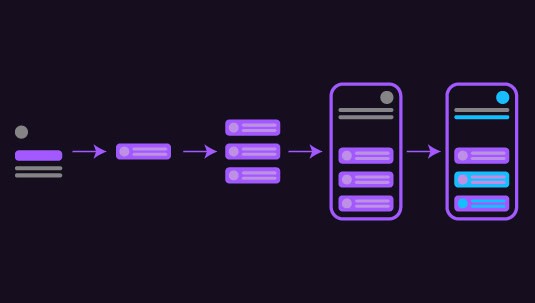
Atomic Design is a methodology introduced by Brad Frost. It breaks down a web design into its most fundamental components, building from smaller units to larger, more complex systems. The methodology consists of five stages:
- Atoms: These are the basic building blocks of matter, such as HTML tags like inputs, buttons, and labels.
- Molecules: Groups of atoms bonded together to form a functional component, like a search form.
- Organisms: More complex structures that form sections of an interface, combining molecules and atoms.
- Templates: Page-level designs that articulate the layout and placement of organisms.
- Pages: Specific instances of templates that include real content.
This systematic approach ensures consistency, scalability, and flexibility throughout the design and development process.
Expert Picks: Best Page Builders for Figma to WordPress Conversion
Harness Atomic Design for a Flawless Figma to WordPress Transformation
Leverage our expert conversion service to ensure a smooth, efficient transition with consistent, scalable, and user-friendly results.
- Let’s Talk
Why Figma?
Figma has emerged as a powerful design tool thanks to its collaborative capabilities and robust features. It allows designers to create dynamic design systems, which align perfectly with the principles of Atomic Design. With Figma, designers can create reusable components (atoms, molecules, and organisms), ensuring consistency and efficiency.

Integrating Atomic Design with Figma
- Design System Cadences: By applying Atomic Design in Figma, designers create a structured design system. This system is composed of reusable elements that can be easily updated. This reduces redundancy and enhances team collaboration.
- Consistency Across Designs: Figma’s component library feature allows designers to maintain consistency across different projects. When an update is made to an atom or molecule in the library, it cascades throughout all instances in the design.
- Efficiency in Prototyping and Feedback: Prototyping with Atomic Design in Figma is intuitive. Designers can easily swap components, test interactions, and receive feedback, making the design process more dynamic and user-focused.
Learn about: Role of Designers and Developers in Figma to WordPress Conversion
Transitioning from Figma to WordPress
After the design process is complete, transitioning from Figma to WordPress efficiently is the next step. WordPress, known for its flexibility and robust ecosystem, can benefit significantly from Atomic Design principles.
Steps for a Seamless Transition
- Export Design Assets: Use Figma to export design components. Ensure that they are optimized for web use.
- Create a Style Guide: Before diving into WordPress, create a style guide based on your atomic components. This will help developers maintain the design consistency established in Figma.
- Develop Custom WordPress Blocks: Utilize the Gutenberg editor by creating custom blocks. Developers can use Atomic Design components to construct these blocks, ensuring that the modularity from Figma is preserved.
- CSS Frameworks and Preprocessors: Leverage CSS frameworks like Bootstrap or preprocessors like SASS to replicate the component structure from Figma. This will streamline the conversion of design components into functional web elements.
- Testing and Feedback Loop: Consistently test the design across various devices and platforms. Gather feedback to ensure that the user experience aligns with the design intentions.
Know: How to Ensure Design Consistency Across Multiple Pages During Figma to WordPress Conversion
Advantages of Using Atomic Design in Figma to WordPress Projects
The most important benefit of atomic design in Figma to WordPress conversion is scalability. As websites grow, maintaining consistency can become a challenge. Atomic Design facilitates scalability without compromising the design integrity. Other advantages include:
- Efficiency: Reusable components save time during both the design and development phases.
- Consistency: With predefined components, maintaining visual and functional consistency across various parts of the site becomes straightforward.
- Collaboration: Atomic Design in Figma promotes better collaboration among team members, ensuring everyone is on the same page.
- User-Centric Design: Prototyping and feedback are integral to Atomic Design, promoting a user-centric approach that prioritizes usability and accessibility.
Read: Best Prototyping Tools for UI/UX Designers
Conclusion
The integration of Atomic Design with Figma and WordPress revolutionizes the web design process by providing a structured, scalable, and efficient methodology. It streamlines collaboration among teams and ensures that both design and development are aligned towards a cohesive goal. By breaking down designs into atomized components and leveraging Figma’s capabilities, designers and developers can work more effectively to deliver outstanding WordPress websites.
Through Atomic Design, the transition from design to deployment becomes seamless, ensuring that the end product is both aesthetically pleasing and functionally robust. As web projects continue to scale in complexity, adopting methodologies like Atomic Design becomes not just advantageous but essential.
FAQs About Atomic Design in Figma to WordPress Conversion
What is Atomic Design?
Atomic Design is a methodology that breaks down web designs into small, reusable components, which are then assembled into larger systems. This approach ensures consistency and scalability.
How does Atomic Design improve the design process?
By promoting reusable components and a systematic approach, Atomic Design reduces redundancy, enhances collaboration, and ensures consistency across design and development phases.
Why is Figma suitable for Atomic Design?
Figma supports component-based design, which aligns perfectly with Atomic Design principles. It offers collaborative tools that make managing and updating design elements straightforward and efficient.
How can Atomic Design be applied in WordPress development?
Through the use of custom blocks in the Gutenberg editor, CSS frameworks, and preprocessors, the modular structure of Atomic Design can be beautifully translated into a dynamic WordPress site.
What are the main benefits of using Atomic Design in web projects?
The key benefits include scalability, efficiency, consistency, enhanced collaboration, and a user-centric design process that focuses on usability and accessibility.