High-fidelity prototype tools help teams bring ideas to life long before development begins. They feel real, look polished, and reveal exactly how users will interact with the final product. Because of this, UX designers, product teams, and startups rely on hi-fi prototyping tools to validate ideas, speed up decision-making, and reduce product risks.
In this guide, you will discover the best high-fidelity prototype tools available today. You will also learn what makes each tool unique, how they support a smoother design workflow, and why they matter for modern digital products.
Let’s explore the top options and help you choose the right tool for your projects.
Why High-Fidelity Prototyping Matters?
High-fidelity prototypes do more than show screens. They simulate real product behavior. This includes animations, transitions, micro-interactions, and working features. As a result, they help teams understand the product’s look, feel, and flow before writing a single line of code.
These prototypes also help you test usability early. You can watch users interact with something that feels almost finished. And because feedback comes early, improvements become faster and cheaper.
For startups, hi-fi prototypes are vital for investor presentations, stakeholder buy-in, and pitch decks. Investors often want to “see the product,” not just hear about it.
Now that we understand the importance, let’s explore the best tools to create these prototypes.
Best High-Fidelity Prototype Tools for UX Designers
Check out these top high-fi prototype tools that are widely used by UX/UI designers, product teams, and startups.
Figma
Figma is widely considered the gold standard for UI design and prototyping. It is cloud-based, fast, and packed with powerful features. Most design teams already use it as their main design hub.
Figma helps teams create prototypes that feel dynamic and engaging. You can add overlays, smart animations, and conditional logic. This makes it ideal for complex flows. And since everything is cloud-based, your team can collaborate seamlessly without encountering version conflicts.
Best For: UX/UI designers, Product teams, and startups that need fast collaboration.
Key Features
- Real-time collaboration
- Advanced prototyping with transitions and animations
- Interactive components
- Auto Layout for responsive screens
- Thousands of community plugins
- Easy developer handoff
Why it Works for Startups: It supports quick product iterations. You can test ideas, gather feedback, and update designs without friction. You can also share prototypes instantly with stakeholders.
Adobe XD
Adobe XD delivers a clean, powerful space for designing high-fidelity prototypes. It integrates smoothly with Photoshop and Illustrator, which helps designers working inside Adobe’s ecosystem.
Adobe XD stands out for its animation strength. Auto-Animate makes complex interactions easy to build. The tool allows you to link screens and create natural, fluid movements that feel realistic.
Best For: Designers who use Adobe products and teams that need strong animation features.
Key Features
- Auto-Animate for smooth transitions
- Voice interactions
- Component states
- Repeat Grid
- Responsive resize
- Coediting support
Why it Works for Product Teams: It streamlines design collaboration when teams already use Adobe tools.
Sketch
Sketch is a pioneer in UI design and remains a favorite for Mac users. It provides strong design features and supports high-fidelity prototyping through native tools and third-party plugins.

Sketch provides a seamless workflow for creating both static and interactive prototypes. However, it is not cloud-native like Figma. Still, its design precision makes it a strong choice for hi-fi visual UI design.
Best For: Mac-based design teams and designers who need pixel-perfect interfaces.
Key Features
- Vector UI design
- Reusable components
- Interactive prototypes
- Collaboration via Sketch Cloud
- Plugin ecosystem
Why it Works for UX Designers: Sketch makes it easy to stay consistent across complex design systems.
Axure RP
Axure RP is one of the most powerful prototyping tools, especially for advanced interactions. It extends beyond visuals, allowing for logic, conditions, and data-driven prototypes.

Axure stands out because it simulates functional behavior. You can build prototypes that look and act like real applications. This helps teams test complex logic early in the process.
Best For: UX researchers, enterprise products, and product teams designing complex workflows.
Key Features
- Conditional interactions
- Dynamic panels
- Data fields and variables
- Documentation and annotations
- Developer handoff
Why it Works for Startups: Startups building complex SaaS tools or dashboards get deeper validation before development.
ProtoPie
ProtoPie focuses on advanced interactions with minimal coding. It’s ideal for mobile apps, wearable interfaces, and products requiring intricate gestures.
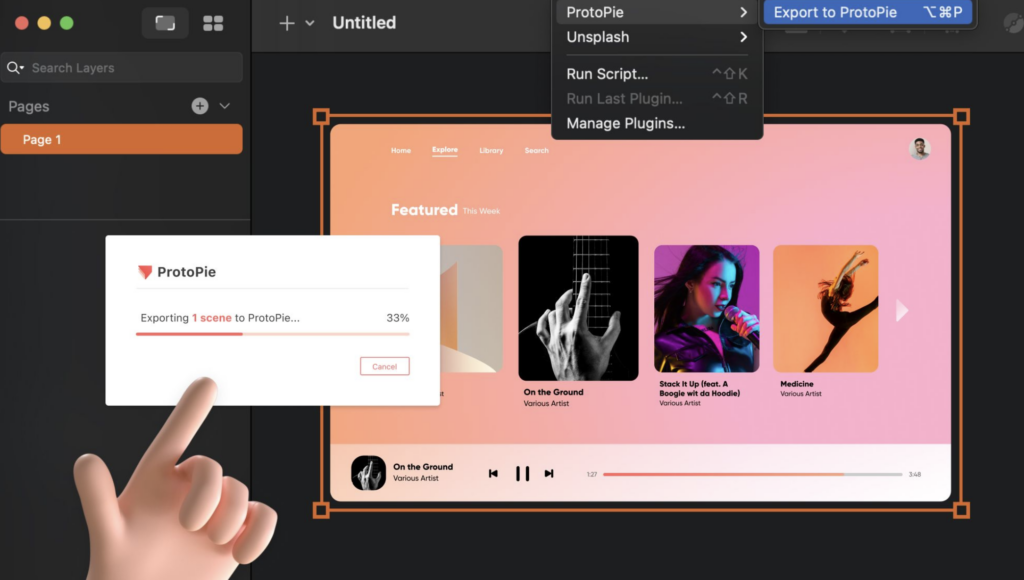
ProtoPie goes beyond basic tap interactions. You can simulate drag gestures, multi-touch, and even tilt movements. Because of this, it’s excellent for immersive user experience testing.
Best For: Mobile app design, gesture-rich prototypes, and UX motion designers.
Key Features
- Sensor-based interactions
- Multi-device communication
- Voice commands
- Timeline-based animations
- Conditional logic
Why it Works for Product Teams: It reveals interaction problems early, which helps you design intuitive user journeys.
InVision
InVision is a long-standing tool in the UX space. It made rapid prototyping simple and collaborative. While many teams now use Figma, InVision still offers strong hi-fi prototyping features.
InVision also integrates with tools like Slack, Jira, and Trello. This makes it easier for cross-functional teams to stay aligned.
Best For: UX/UI teams who need straightforward click-through prototypes. It also includes remote collaboration.
Key Features
- Interactive hotspots
- Transitions and animations
- Freehand brainstorming
- User testing integration
- Version control
Why it Works for Startups: Its simplicity helps teams move quickly without a steep learning curve.
Framer
Framer blends the best of design and no-code development. It enables designers to create interactive prototypes that closely resemble real products.

Framer stands out because prototypes behave like actual web apps. You can adjust motion, add logic, and publish live previews.
Best For: Designers who want near-production prototypes. Additionally, for teams building web apps and landing pages, as well as startups requiring rapid validation.
Key Features
- Realistic animations
- Component-level prototyping
- Responsive design
- Code overrides
- Direct publishing to the web
Why it Works for UX Designers: You can create nuanced animations without writing heavy code.
Marvel
Marvel offers a friendly interface and quick prototyping features. It suits smaller teams and early-stage startups.
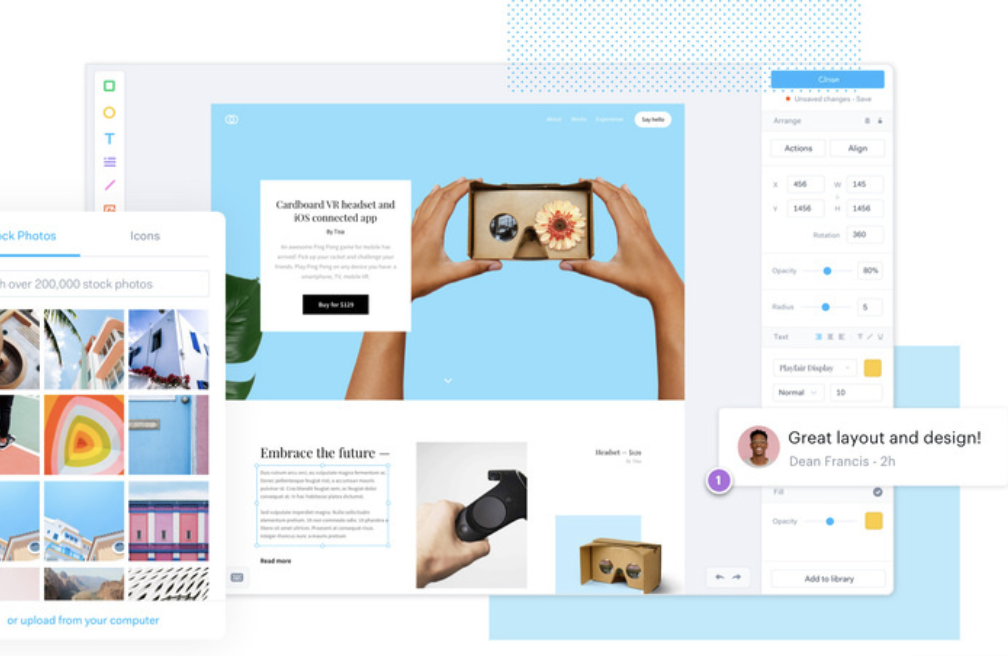
Marvel makes it easy to turn sketches or static designs into clickable prototypes. Its simplicity helps teams test early without spending too much time on setup.
Best For: UX teams needing simple prototypes and quick user testing.
Key Features
- Drag-and-drop prototyping
- Basic animations
- User testing
- Developer handoff
Why it Works for Startups: It supports rapid validation. You can launch prototypes fast and gather feedback even faster.
Balsamiq (High-Fidelity Add-Ons)
Although Balsamiq is known for low-fidelity wireframes, many UX teams use it to transition into high-fidelity prototypes with external integrations.
While not a traditional hi-fi tool, it plays a valuable role in building layouts before moving into hi-fi platforms.
Best For: Early thinking and teams transitioning from low-fi to high-fi
Key Features
- Quick wireframing
- Strong layout structure
- Export options
Why it Works for Product Teams: It builds clarity early, reducing rework later.
Justinmind
Justinmind is another powerful tool designed for detailed hi-fi prototypes. It supports complex interactions and responsive layouts.
Justinmind helps teams create realistic prototypes for mobile and web. Its interaction options allow detailed user flows.
Best For: Enterprise UX teams, mobile app prototyping, and UX researchers.
Key Features
- Interactive UI elements
- Conditional navigation
- Advanced forms
- Variables and data input
- Design system library
Why it Works for UX Designers: It enables deeper testing before development begins.
How to Choose the Right High-Fidelity Prototyping Tool?
Selecting the right high-fidelity prototyping tool depends on your workflow, project complexity, and team structure. A well-chosen tool can streamline collaboration, improve user testing, and accelerate development handoff. Therefore, it is helpful to understand what each tool offers before committing. Here’s a clear breakdown to guide your decision.
- For Collaboration-Heavy Teams: Figma and Framer are ideal when multiple people need to work together on design. They offer real-time editing, instant feedback, and smooth sharing. As a result, teams stay aligned throughout the design process.
- For Advanced Interactions: ProtoPie and Axure RP shine when you need complex logic or rich interactions. They support conditions, variables, and detailed animations. Therefore, they are ideal for testing dynamic or data-driven workflows.
- For Adobe Ecosystem Designers: Adobe XD is the natural fit if you already use Adobe tools. It connects well with Photoshop and Illustrator, which helps maintain consistency across assets.
- For Mac-Based Designers: Sketch remains the top choice for Mac users. Its refined interface and strong component system make pixel-perfect UI work simple and efficient.
- For Simple Prototypes: Marvel and InVision work well for quick flows. They keep things simple and allow fast testing without complicated setup.
- For Near-Production Web Prototypes: Framer delivers prototypes that feel almost real. Its responsive features make it perfect for live previews and early validation.
Key Features to Look For in High-Fidelity Prototyping Tools
Choosing the right high-fidelity prototyping tool becomes easier when you clearly understand the features that matter most. These features influence your workflow, design quality, and collaboration experience. Therefore, it is helpful to evaluate each tool through the lens of your team’s needs and project goals.
- Interaction Depth: Your tool should offer smooth animations, transitions, gestures, and micro-interactions. These elements help you build realistic prototypes that mirror real product behavior.
- Collaboration: Real-time collaboration is essential for modern teams. You should be able to easily share designs, gather instant feedback, and collaborate without delays.
- Developer Handoff: Look for tools that provide clean specs, code snippets, and downloadable assets. This enhances communication and accelerates development.
- Scalability: As your projects grow, your tool must support larger files, design systems, and complex workflows. Therefore, scalability becomes a key factor.
- Plugins and Integrations: Plugins help automate tasks and streamline your process. Good integrations connect your design tool with your workflow tools.
- Cross-Platform Support: Cloud-based tools enable designers and developers to collaborate from anywhere. This is especially helpful for distributed or hybrid teams.
With these features in mind, you can confidently select a tool that aligns with your goals and enhances your design process.
Benefits of Using High-Fidelity Prototypes
High-fidelity prototypes offer clear value to UX designers, product teams, and startups. They bring ideas to life in a realistic way, which helps teams make smarter decisions early.
When prototypes resemble real products in both appearance and functionality, feedback becomes more accurate, and development becomes smoother. Here are the key benefits you gain.
- Better User Testing: Users interact more naturally when the prototype feels real. As a result, you gather insights that reflect actual behavior and expectations.
- Faster Buy-In: High-fidelity visuals make it easier for stakeholders to understand the concept. This speeds up approvals and keeps projects moving forward.
- Reduced Development Risks: Because you validate designs early, you catch flaws before coding begins. This reduces rework and prevents costly mistakes later.
- Clearer Developer Communication: Developers see how interactions, animations, and transitions should work. This removes guesswork and ensures accurate implementation.
- Stronger Design Consistency: Hi-fi prototypes help teams maintain a unified design system. Every screen, component, and interaction follows a consistent pattern.
- More Engaging Presentations: When prototypes feel functional, investors and decision-makers instantly connect with the vision. They can visualize the product in action.
These benefits make high-fidelity prototypes essential for building better products with confidence and clarity.
Future Trends in High-Fidelity Prototyping
High-fidelity prototyping continues to evolve as design teams embrace new technologies and workflows. These advancements make the design process faster, more accurate, and highly collaborative.
As tools grow smarter, designers gain more power to create realistic experiences with less effort. Here are the trends shaping the future of prototyping.
- AI-Assisted Prototyping: AI now supports designers by suggesting layouts, generating assets, and automating interactions. This reduces manual work and speeds up early design stages.
- Real-Time Collaboration: With distributed teams becoming the norm, synchronous editing and instant previews are essential for seamless collaboration. These features help teams stay aligned and make decisions quickly.
- No-Code Interaction Building: More tools allow designers to create complex, gesture-rich interactions without coding. This lowers barriers and makes advanced prototyping accessible to everyone.
- Multi-Device Prototyping: Designers now build for mobile, web, wearables, and even VR. Therefore, tools are expanding to support richer, cross-device experiences.
- Component-Based Design Systems: Reusable components help maintain consistency across large projects. They also make updates easier, which improves scalability.
These trends show how high-fidelity prototyping is becoming more intelligent, flexible, and user-friendly. As a result, design teams can deliver polished experiences faster than ever.
Final Thoughts
High-fidelity prototyping tools are essential for today’s UX designers, product teams, and startups. They help you present ideas with clarity, validate user experiences early, and build confidence before development begins. By selecting the right tool, you can streamline collaboration, expedite decision-making, and produce products that feel polished from the outset.
Whether you need advanced interactions, cloud collaboration, or realistic web behaviors, there is a prototyping tool designed to match your workflow. Start exploring these options and pick the one that empowers your team to design better, test smarter, and deliver exceptional experiences.
FAQs About Prototyping Tools
What is a high-fidelity prototype?
A high-fidelity prototype is a detailed, interactive model of a product that looks and behaves like the final version. It includes real visuals, animations, and functional interactions.
Why should designers use high-fidelity prototypes?
Designers use high-fidelity prototypes because they help test real user behavior, reduce development errors, and improve stakeholder understanding.
Which tool is best for team collaboration?
Figma is often the best tool for collaboration because it supports real-time editing, seamless sharing, and cloud-based teamwork.
Are high-fidelity prototypes suitable for usability testing?
Yes, high-fidelity prototypes are ideal for usability testing because they provide a realistic product experience, leading to more accurate user feedback.
Do high-fidelity prototypes save development time?
Yes, they save development time by identifying issues early, clarifying interactions, and giving developers a clear reference before coding begins.