


To create engaging web experiences, especially during Figma to WordPress conversions, staying ahead of UI/UX design trends is crucial for designers and developers. As we enter 2026, new technologies and user expectations are shaping how we create seamless digital experiences.
Whether you’re designing in Figma or transitioning to WordPress, understanding these trends can help you craft the best user experiences. This article explores the top UI/UX design trends and offers practical advice on how to implement them.
Why Keeping Up with the Latest UI/UX Design Trends Matters?
Staying up-to-date with the latest UI/UX design trends is crucial for both designers and businesses. In the fast-paced world of digital design, trends evolve rapidly, reshaping how users interact with technology. Being aware of these shifts helps ensure that your designs remain relevant, engaging, and competitive.
Enhancing User Experience
Firstly, incorporating the latest trends can significantly enhance the user experience. New design elements often focus on improving usability, accessibility, and user satisfaction. By adopting these trends, you ensure that your product meets modern expectations and provides a seamless experience, which is key to retaining users.
Fostering Innovation
Keeping up with trends fosters innovation. Designers can draw inspiration from emerging techniques and technologies, resulting in innovative solutions and fresh perspectives. This innovative edge can help differentiate your brand in a crowded marketplace.
Remaining Competitive
Staying updated ensures you remain competitive. Businesses that ignore contemporary design trends risk appearing outdated, potentially losing customers to more forward-thinking competitors. By integrating current trends, you signal to users that your brand is modern and attuned to their needs.
Improving Brand Perception
Furthermore, adopting new design trends can improve brand perception. A polished, up-to-date user interface conveys a sense of professionalism and attention to detail, enhancing trust and credibility among users.
Overall, by staying current with the latest UI/UX design trends, you create intuitive, innovative, and inviting experiences that delight users and maintain your competitive advantage in a rapidly evolving digital landscape.
Leverage the Latest UI/UX Trends and Set Your Website Apart!
Transform your Figma designs into trend-setting WordPress sites today! Contact us for a consultation and start designing the future of your website.
Best UI/UX Design Trends to Watch Out For
As we look towards 2026, several UI/UX design trends are set to transform the digital landscape. Embracing these trends will enable designers to create more engaging and user-friendly experiences.
1. Dark Mode Designs
Dark mode offers a visually appealing alternative to traditional light interfaces. It reduces eye strain in low-light environments and particularly benefits mobile apps. In Figma, designers can create both light and dark mode designs and use components & styles to switch between them.
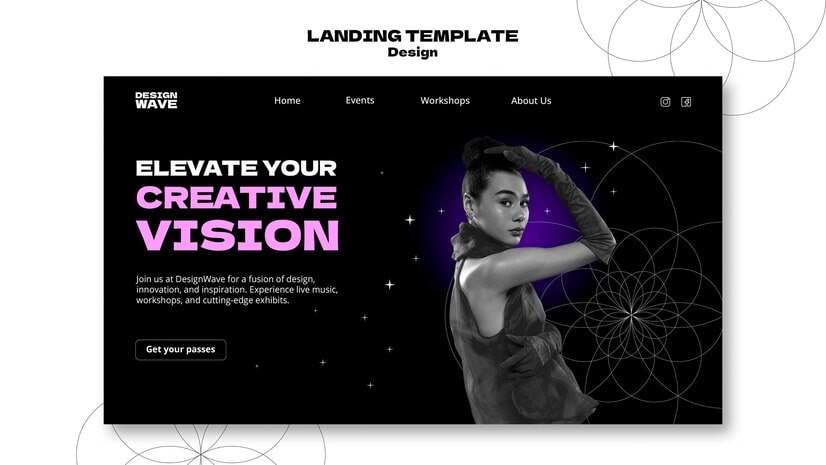
When converting designs to WordPress, utilizing responsive themes like Astra or Neve that support dark mode ensures users can toggle easily between the two, providing a better user experience.
Key Considerations
- Accessibility: Ensure that color contrasts in dark mode are sufficient for readability. Tools like Stark in Figma help designers test accessibility standards.
- Performance: Dark themes can save device battery life, making them popular among mobile users.
- Aesthetic Consistency: Align the style guide for both light and dark themes to maintain visual consistency across different modes.
Top 10: Best Prototyping Tools for UI/UX Designers
2. Neumorphism
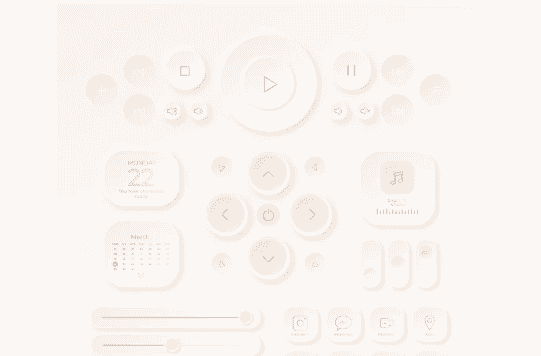
Neumorphism blends skeuomorphism and flat design to create soft, extruded shapes that provide depth. It focuses on using subtle shadows and highlights to mimic a physical style while retaining a modern look.
Key Considerations
- Implementation Complexity: Craft this style by using Figma’s advanced shadow and blur effects. Neumorphic elements should be detailed yet subtle enough not to overwhelm users.
- WordPress Compatibility: While transitioning from Figma to WP, ensure CSS styles are optimized to achieve the same depth effects across different browsers and devices.
- Balance: Strike a balance so that visual elements remain intuitive and don’t compromise on usability.
3. Micro-Interactions
Micro-interactions are small animations that boost user engagement without being intrusive. They provide feedback for user actions, guide users on what to do next, and offer interesting visual cues.
Key Considerations
- Prototyping in Figma: Utilize Figma’s prototyping features to fine-tune the timing of animations and check their natural flow.
- User Engagement: Design engaging interactions like button hover effects, loading animations, and form validation feedback.
- Optimizing in WordPress: Use lightweight JavaScript libraries like Lottie or custom CSS animations to recreate these micro-interactions without lag.
Related: How to Convert Figma to WordPress with Custom Animations & Microinteractions
4. 3D Visuals and Imagery
With the advancement of technology, 3D visuals have become more accessible and are now used to create engaging, lifelike content. Incorporating 3D elements can enhance storytelling and make a website more immersive.

Key Considerations
- Figma Integration: Employ 3D plugins like Spline or Blender integration to create and adjust 3D models within your design workflow.
- User Engagement: Use 3D icons and models to visually enrich interfaces, especially for product showcases on e-commerce sites.
- Performance Challenges: Ensure proper optimization when moving 3D designs to WordPress to prevent performance hits on load times.
5. Inclusive and Accessible Design
Designing for inclusivity and accessibility ensures that digital experiences are usable by all people, regardless of their abilities or disabilities. This trend is gaining momentum as more organizations recognize the importance of catering to a diverse audience.
Key Considerations
- Universal Design Principles: In Figma, use accessibility tools and guidelines to create accessible and navigable designs for everyone. Consider color contrast, text size, and keyboard navigation.
- Compliance and Testing: Use WordPress plugins and tools to check and ensure compliance with standards like WCAG (Web Content Accessibility Guidelines). This might include adding alt text to images, offering text-to-speech options, and ensuring form accessibility.
- User Empathy: Conduct usability testing with people from various backgrounds and abilities to truly understand their needs and challenges.
6. Emotional Design and Storytelling
Emotional design focuses on creating a connection with users by evoking specific emotions. Storytelling, on the other hand, guides users through a narrative to make their experience more memorable and engaging.
Key Considerations
- Color and Typography: In Figma, strategically use color theory and typography to evoke emotions and set the tone for your design. For example, warm colors might invoke comfort, while cool colors could convey professionalism.
- Narrative Techniques: Use design elements that contribute to a coherent story, such as progression bars or guided walkthroughs. This helps users feel like they are a part of the journey and are more connected to the brand or product.
- Content Strategy: On WordPress, integrate multimedia elements like videos, animations, and compelling copy to tell a story that resonates with your audience. This can significantly enhance the user’s emotional engagement and retention.
Read: Redesign or Design Update
7. Minimalism and Functional Simplicity
Minimalist design strips away the non-essential, allowing the function to reign supreme. It’s marked by clean lines, ample white space, and simplicity.
Key Considerations
- Design Consistency: Use Figma to consistently employ grids, spacing, and typography across designs to enhance clarity and coherence.
- Loading Speed: In WordPress, select themes and plugins optimized for speed, minimizing the number of loaded resources.
- User Focus: Prioritize content and functionality that genuinely benefit the user, avoiding clutter.
8. Personalized User Experiences
Personalization in UI/UX design aims to create unique user experiences. It involves using data to inform decision-making, tailoring layouts, and delivering content.
Key Considerations
- Data Utilization: In Figma, design different user flows based on varied user personas, ensuring each path feels custom-fit.
- Dynamic Content: Use WordPress plugins to adapt content based on user history or preferences, enhancing engagement.
- Privacy Concerns: Balance personalization with users’ privacy by being transparent about data usage and providing clear opt-out options.
9. Sustainable and Ethical Design
As digital consumption increases, there is a greater focus on building sustainable web solutions. This involves not just environmentally friendly hosting but also promoting ethical design choices.

Key Considerations
- Resource Efficiency: Use Figma to streamline design processes, focusing on reducing redundancy and improving workflow efficiency.
- Green Hosting Solutions: Choose WordPress hosting providers like GreenGeeks that are committed to green energy to reduce carbon footprints.
- Content Responsibility: Ensure designs don’t promote misinformation or unhealthy online habits, advocating ethical and sustainable design standards.
10. AI-Powered Design Tools
AI tools are revolutionizing UI/UX design by automating tasks, enhancing creative possibilities, and providing deeper user insights.
Key Considerations
- Creative Assistance in Figma: Use AI plugins to automate layout creation or generate design variations, vastly cutting down on design time.
- Content Curation on WordPress: Implement AI-driven tools like Rank Math for SEO and content suggestions, ensuring your WordPress site remains relevant and optimized.
- User Insights: Leverage AI to analyze user behaviors and adjust design strategies dynamically, creating a constantly improving user experience.
Learn more: The Role of Atomic Design in Figma to WordPress Projects
11. Modular Design Systems
Modular design systems have gained traction as a method for creating flexible and scalable user interfaces. These systems break down a design into interchangeable modules or components, allowing designers to efficiently manage and update complex interfaces across various platforms.
Key Considerations
- Establish a Comprehensive Style Guide: Develop detailed guidelines covering the appearance and behavior of each module to maintain consistency across the interface.
- Foster Designer-Developer Collaboration: Encourage close teamwork between designers and developers to ensure that modules are visually appealing and functionally sound.
- Focus on Reusability: Design modules with reusability in mind to efficiently manage updates and scaling across multiple platforms.
- Ensure Standardization: Implement standardized practices to streamline the design process and reduce the potential for errors.
- Test for Compatibility: Regularly test modules across various devices and platforms to ensure seamless functionality and appearance.
12. Immersive Scrolling Experiences
Immersive scrolling experiences leverage dynamic animations and content transformations to engage users as they navigate through a webpage. This trend transforms traditional scrolling into a more interactive and captivating journey, enhancing user engagement and storytelling.
Key Considerations
- Focus on Smooth Transitions: Ensure animations and transitions are fluid to prevent disrupting the user’s experience and maintain engagement.
- Create Engaging Animations: Design animations that enhance the storytelling aspect without overwhelming or distracting the user.
- Balance Creativity and Usability: Ensure that scrolling effects are not only creative but also serve a functional purpose to enhance the user experience.
- Test Across Devices and Browsers: Conduct thorough testing to guarantee that the scrolling experience is consistent and accessible on all platforms and devices.
- Enhance Content Narrative: Use scrolling effects to support and enrich the content’s story, making the interaction more meaningful and memorable.
13. Biometric Authentication Features
Biometric authentication features use unique biological characteristics, such as fingerprints or facial recognition, to provide secure and convenient access to digital platforms. This trend is gaining popularity as it enhances security while streamlining the user authentication process.
Key Considerations
- Prioritize User Privacy and Data Protection: Adhere to strict security protocols and regulations to safeguard users’ biometric data.
- Offer Alternative Authentication Methods: Provide backup options to accommodate diverse user preferences and accessibility requirements.
- Ensure Device Compatibility: Make sure biometric authentication functions smoothly across a variety of devices to cater to all users.
- Maintain Quick and Reliable Responses: Optimize the system for fast and accurate authentication across various environments to enhance user confidence.
- Enhance Security and User Experience: Implement biometric features thoughtfully to improve overall security while ensuring a seamless user experience.
To Sum Up
Understanding and adopting the latest UI/UX design trends is essential for creating meaningful user experiences. As these trends continue to evolve, tools like Figma and WordPress provide powerful platforms for bringing innovative design concepts to life. By staying updated and integrating these trends thoughtfully, designers and developers can ensure that their projects not only meet modern standards but exceed user expectations.
FAQs About UI/UX Design Trends
How can I implement dark mode on my WordPress site?
Dark mode can be implemented using themes that support it or by adding custom CSS. Plugins like WP Dark Mode can also make the transition seamless.
What tools can I use in Figma for 3D designs?
Figma offers plugins such as Spline, which allow you to integrate 3D elements into your designs easily.
Why is personalization important in UI/UX design?
Personalization enhances user engagement by delivering content that aligns with individual user preferences, leading to increased satisfaction and retention.
How does AI enhance UI/UX design in Figma?
AI can automate repetitive tasks, suggest design improvements, and provide real-time user insights, thus enhancing efficiency and creativity in the design process.
What are micro-interactions, and why are they important?
Micro-interactions are small design elements that provide feedback or guidance to users. Thus, improving usability and interaction by making the interface more intuitive.



