The integration of advanced technologies like brain-to-text interfaces presents a revolutionary shift in communication systems, especially for individuals with severe motor impairments. Imagine a world where thoughts could be directly converted into text, breaking barriers for those unable to communicate traditionally.
In this increasingly digitized era, leveraging powerful design platforms like Figma and versatile content management systems like WordPress becomes essential. This article delves into designing brain-to-text interfaces with Figma and converting these designs into fully functional WordPress websites, all while keeping accessibility at the forefront.
1] What Are Brain-to-Text Interfaces?
Brain-to-text interfaces are cutting-edge technology that translates neural activity into written language. These interfaces offer the revolutionary capability of converting thoughts directly into text. At their core, brain-to-text interfaces operate by detecting and interpreting brain signals, which are then converted into text output.

Using sophisticated algorithms and machine learning models, these systems decode neural activity patterns into comprehensible language. Typically, users wear sensors that capture brain wave signals, which are then processed in real time to generate words on a screen.
Key Components and Features
Several critical components constitute brain-to-text systems. First, sensor arrays capture brain activity. These sensors are often noninvasive and placed on the scalp to detect electrical patterns. Next, a processing unit equipped with machine learning algorithms transforms these patterns into written words.
Moreover, user interfaces provide visual feedback, enabling users to see the text generated by their thoughts. Lastly, adaptability features are essential to accommodate individual differences in brain activity and enhance overall accuracy.
Challenges and Considerations in Design
Designing brain-to-text interfaces involves various challenges and considerations. One major challenge is ensuring accuracy in interpreting brain signals, as neural activity can be noisy and complex. Furthermore, maintaining real-time processing speeds is crucial for effective communication. Web designers must also prioritize accessibility, ensuring the interface is user-friendly and accommodating to users with diverse abilities.
In addition, ethical considerations, such as data privacy and security, are vital since sensitive neural data is involved. Finally, the web design process should focus on user experience, ensuring the system is intuitive and responsive to user needs even in complex projects.
Read: The Role of A/B Testing in Figma to WordPress Conversion Projects
Your Gateway to Brain-to-Text Wonders with Figma and WordPress!
Transform your ideas into reality with our expertise in Figma and WordPress. Contact us now to start your journey into Brain-to-Text wonders!
2] Importance of Accessibility in Web Design
In web design, accessibility is critical to ensuring all users can effectively interact with digital content. This inclusivity is not just a trend but a necessary component of ethical and practical web development.

- Creating an Inclusive User Experience: Creating an inclusive user experience means considering the needs of every potential visitor to your website. Designers must ensure that individuals with varying abilities can effortlessly navigate and interact with web interfaces. This requires thoughtful design choices that consider diverse user requirements.
- Key Considerations for Accessibility: Accessibility in web design involves several key considerations. Intuitive navigation helps users find information easily, while clear visual design aids comprehension and usability. Additionally, it is crucial to ensure compatibility with a wide array of devices and assistive technologies, such as screen readers. Together, these elements create a smoother user experience for everyone.
- Benefits of Prioritizing Accessibility: By prioritizing accessibility, organizations not only meet moral and legal standards but also extend their reach to a broader audience. Websites designed with accessibility in mind can attract more users, including those with disabilities, thereby enhancing audience diversity and engagement.
- Accessibility in Brain-to-Text Interfaces: When designing brain-to-text interfaces, incorporating accessibility from the outset is absolutely essential. These interfaces serve users who may rely significantly on accessible features. Thus, integrating intuitive navigation, clear designs, and device compatibility in both the design and subsequent conversion to platforms like WordPress is vital to achieving inclusive communication solutions.
Related: Design Accessibility Tips to Ensure Figma Designs Translate Well to WordPress
3] Designing Brain-To-Text Interfaces in Figma
Designing brain-to-text interfaces in Figma involves leveraging its comprehensive design tools to create user-friendly interfaces. This process requires careful planning and attention to detail to meet the unique needs of users.

Setting Up Your Figma Workspace
Before diving into design, it is crucial to set up an efficient Figma workspace. Organizing files, creating a consistent system for components, and setting up design tokens for typography and color palettes ensures a streamlined design process and facilitates collaboration. Also, make use of Figma’s responsive design features to make the final web design process simple.
Creating Wireframes for Brain-To-Text Interfaces
Wireframing is an essential step that involves sketching out the basic structure and layout of the interfaces. It helps visualize the user journey and ensures all necessary elements for the brain-to-text functionality are incorporated from the beginning.
Defining User Flows
Defining user flows involves mapping out the steps a user takes to complete tasks within the interface. This step is vital in understanding user interactions and ensuring the design accommodates seamless navigation and task completion.
Designing Intuitive UI/UX Elements
When designing UI/UX elements, the focus should be on intuitiveness and ease of use. This involves creating visually clear and functionally efficient controls, ensuring that users can operate the interface without confusion or difficulty.
Incorporating Accessibility Features
Incorporating accessibility features into the design ensures that users with diverse abilities can effectively use the interface. This includes features like screen reader compatibility, adjustable text sizes, and sufficient contrast ratios, which are crucial for readability and usability.
Prototyping and Testing in Figma
Prototyping in Figma allows designers to create interactive models of their designs, simulating real-time user interactions. Testing these prototypes with users is essential for identifying usability issues and gathering insights into user experiences.
Gathering Feedback and Iterating
Receiving feedback is a critical part of the design process. By gathering feedback from users and stakeholders, designers can identify areas for improvement. Iterating on the design based on this feedback ensures that the final product meets user needs and expectations.
Learn about: Best Prototyping Tools for UI/UX Designers
4] Building a WordPress Site with Figma Designs
Converting Figma to WordPress involves a methodical process to ensure that the visual integrity and functionality envisioned during design are translated accurately onto the web.
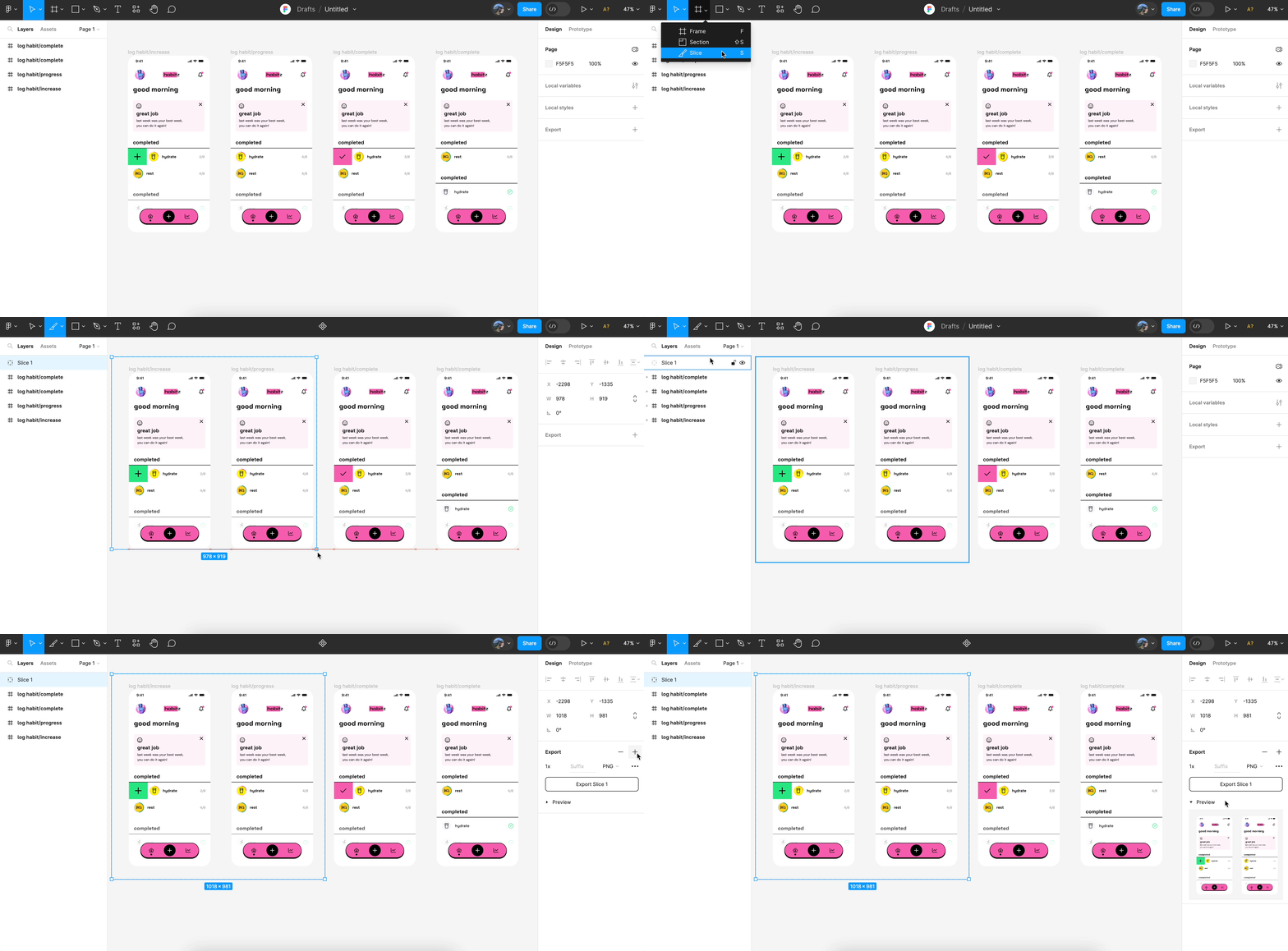
Exporting Assets from Figma
The initial step in converting Figma designs to WordPress is exporting the necessary design assets. This includes images, icons, and any other visual elements integral to the website’s design. Properly exporting these assets ensures they are optimized for web use and ready for seamless integration into WordPress.
Preparing Images and Icons
Preparing images and icons involves ensuring they are web-friendly. This means optimizing file sizes for faster load times without compromising quality. Additionally, consider using scalable vector graphics (SVGs) for icons to maintain clarity across different screen sizes.
Choosing the Right WordPress Theme
Selecting an appropriate WordPress theme is crucial to align the website’s layout and functionality with the original Figma design. WordPress themes can provide a solid foundation and save time by offering built-in features that support your design objectives.
Using Page Builders or Custom Coding
The design can be implemented into WordPress through page builders, such as Elementor or SeedProd, which allow for flexible drag-and-drop customization. Alternatively, custom coding may be used to achieve more specific design needs or functionalities not supported by themes or builders.
Implementing the Design in WordPress
To implement the design in WordPress, careful placement and styling of elements according to the Figma prototype are necessary. This phase includes arranging text, images, and forms to replicate the intended user experience.
Ensuring Responsive Design
Ensuring responsive design means adapting the website to function and display correctly across various devices and screen sizes. This is critical for providing a consistent and accessible user experience, and it involves thorough testing and adjustments in CSS to maintain layout integrity.
Finally, thoroughly testing and validating the website on WordPress ensures that everything functions as expected. This includes checking interactive elements, forms, and links. Validating the site ensures there are no errors and that the design appears correctly across different browsers and devices.
Read: How to Choose the Right WordPress Theme for Your Figma Design
5] Technical Considerations for Brain-To-Text Interfaces
Designing brain-to-text interfaces involves navigating various technical challenges to create efficient and user-friendly systems. These interfaces rely heavily on advanced technologies to accurately interpret and process brain signals, enabling seamless communication.
- Integration with Brain-Computer Interfaces (BCIs): A critical aspect of brain-to-text interfaces is their integration with Brain-Computer Interfaces (BCIs). BCIs act as a bridge between the human brain and computers, translating neural activity into commands. Ensuring smooth integration is essential, as it allows for real-time interpretation and response, facilitating effective communication for users with different needs.
- Future Trends and Emerging Technologies: Staying abreast of future trends and emerging technologies in the field of brain-to-text interfaces is crucial. Advancements in machine learning and neuroscience continue to drive innovation, making these interfaces more accurate and accessible. Keeping informed about these trends enables developers to incorporate the latest improvements and maintain the interfaces’ relevance and effectiveness.
- Security and Privacy Concerns: As brain-to-text interfaces handle sensitive neural data, addressing security and privacy concerns is of utmost importance. Safeguarding users’ data involves implementing robust encryption and access controls to prevent unauthorized access and potential misuse. Designing systems with privacy by design principles ensures compliance with data protection regulations and fosters user trust and confidence in the technology.
Know more: User-Centric Design: Figma User Testing for WordPress Websites
6] Real-World Impact of Brain-To-Text Interfaces
Brain-to-text interfaces offer transformative capabilities with significant real-world implications, particularly for individuals with severe motor impairments. By enabling new modes of communication, these technologies can dramatically improve quality of life and societal integration.
- Transformative Potential for Individuals with Motor Impairments: The integration of Figma and WordPress in developing brain-to-text interfaces presents substantial benefits for individuals with conditions like paralysis. By facilitating communication through thought-to-text conversion, these interfaces empower users with a new level of independence and interaction, improving their daily lives and social engagement.
- Broader Societal Implications: The ripple effects of brain-to-text technology extend beyond individual benefits, offering broad societal implications. As these interfaces become more prevalent and integrated into various applications, they can redefine how communication is approached in healthcare, education, and beyond. Their widespread adoption can lead to more inclusive environments and inspire further innovations in assistive technologies.
- Importance of Accessibility and Availability: Ensuring that brain-to-text interfaces are accessible and widely available is crucial. The fruitful combination of Figma’s design capabilities and WordPress’s flexible platform underscores the significance of creating user-friendly and scalable solutions. Making these technologies accessible ensures they can reach and benefit a larger audience, emphasizing the importance of continuous development and distribution efforts.
Conclusion
In conclusion, designing brain-to-text interfaces involves a meticulous, user-centeric approach to ensure that accessibility and intuitiveness are firmly in place. Figma’s extensive design capabilities and WordPress’s flexible platform support the creation of intricate and engaging web experiences.
Together, these tools empower developers to craft immersive environments that expand communication possibilities for individuals with severe impairments. For further assistance in combining these technologies for your project, it is recommended that you engage with professionals experienced in Figma and WordPress integration.
FAQs About Designing Brain-to-text Interfaces in Figma
How does Figma simplify web development for WordPress websites?
Figma simplifies WordPress web development by offering a robust set of features that enhance the design process. Its powerful tools enable designers to create visually consistent and interactive prototypes, ensuring an optimal user experience. These prototypes can be easily translated into WordPress themes, streamlining development and reducing the chances of discrepancies between design and implementation.
Is hiring an agency for the Figma to WordPress conversion process better than using WordPress plugins?
Yes, hiring an agency is beneficial for the Figma to WordPress conversion process as they provide valuable insights and expertise. Agencies can offer enhanced customization and readability of code, ensuring a high-quality, professional outcome that may be difficult to achieve using plugins alone.
What are the key Figma prototyping features?
Key prototyping features in Figma include interactive components, dynamic overlays, and animated transitions. These features allow designers to simulate user interactions and visualize how a website will function in real-world scenarios. Figma also offers the ability to create connections between frames and incorporate elements such as hover states and clickable buttons, making it a comprehensive tool for developing realistic prototypes.
What is the use of CSS files and HTML/CSS in Figma conversion?
CSS files and HTML/CSS are crucial in Figma conversion as they define the structure and styling of a web design when transitioning to a WordPress site. During the conversion process, elements designed in Figma are translated into HTML for structure and CSS for styling. This translation ensures the design’s visual integrity and functionality are preserved when implemented on a WordPress platform.