

In web design, the synergy between design tools and content management systems is more significant than ever. Figma is a leading tool with collaborative features and an intuitive interface. On the other hand, WordPress is a dominant force in website development. Combining Figma and WordPress in a web design workflow can significantly enhance efficiency, creativity, and output quality. This article delves into the benefits of using Figma for WordPress web design, focusing on the key advantages and a brief overview of the conversion process.
The Power of Figma in the Design Process
Figma is a web-based design tool that facilitates real-time collaboration and prototyping. It stands out due to its accessibility and ease of use. Designers appreciate Figma for its innovative features, like vector networks and modern pen tools, which simplify the creation of complex shapes and enhance design precision.
- Collaboration and Real-Time Editing: One of Figma’s standout features is its ability to support multiple users simultaneously working on the same file. This feature is particularly useful for teams, as it allows for real-time feedback and iteration. Design teams can collaborate with clients to ensure their vision aligns with the project goals, eliminating many communication challenges.
- Prototyping and User Testing: Figma’s prototyping capabilities allow designers to create interactive mockups, which can be tested before development begins. These prototypes can include animations and transitions, offering a dynamic preview of the user experience. This functionality is pivotal in identifying usability issues early, making it easier to address them before launching the WordPress site.
Expert Picks: Best UI/UX Design Trends
Benefits of Integrating Figma with WordPress
Here are the top benefits of using Figma for WordPress website design:
Improved Design Consistency
Figma allows for the creation of design systems, which include reusable components like buttons, icons, and color schemes. These systems ensure consistency across all pages of a WordPress website. Designers can update a component in Figma, and all instances of that component will adapt accordingly. This feature simplifies maintaining a cohesive look and feel throughout the site.
Enhanced Responsiveness
Responsiveness is crucial for modern websites, given the diverse range of devices used to access web content. Figma’s design tools allow designers to create responsive layouts, which can then be implemented in WordPress, ensuring that websites look great on any device. Moreover, the use of layout grids and constraints in Figma aids in designing flexible and adaptive layouts.
Streamlined Feedback Loop
The collaborative nature of Figma enables a more efficient feedback loop. Clients and stakeholders can comment directly on the designs, which expedites decision-making and approval processes. This interactivity translates into faster project completion times and refines the final WordPress product.
Cost Efficiency
Utilizing Figma can lead to cost savings in the long run. The ability to prototype and test designs before development begins reduces the likelihood of costly revisions later. Moreover, the efficiency gained through streamlined collaboration and design consistency can lower overall project expenses.
Ultimate List: Best Figma to WordPress Agencies
How Can We Help?
If you have Figma design and want to create a WordPress website, then here’s how we at figtowp can assist you:

Custom Theme Development
We specialize in developing custom WordPress themes that faithfully translate your Figma designs into web-ready formats. Each design aspect, from fonts to color schemes, is meticulously converted to maintain the integrity of your original vision.
Example: If your Figma design includes unique hover effects or animations, we’ll implement these precisely using CSS and JavaScript, ensuring they function smoothly on the final website.
Responsive and Mobile-Ready Design
Our team ensures that your WordPress site functions seamlessly across all devices. We adapt your Figma designs to be responsive, so your site looks great on smartphones, tablets, and desktops.
Example: We use media queries to adjust image sizes and layout structures dynamically, providing a flawless experience on both large and small screens.
Read more: Role of Figma in Building Mobile-Responsive WordPress Websites
Optimized Page Speed
We prioritize fast loading times by optimizing your images and implementing best coding practices. This enhances user experience and boosts your site’s SEO performance.
Example: By compressing images and reducing unnecessary scripts, we ensure that your WordPress site loads quickly, even with high-resolution Figma designs.
Related: How to Optimize Figma Designs for WordPress Page Speed and Performance
Seamless User Experience
We focus on creating an intuitive navigation system that enhances user experience. Using your Figma wireframes, we establish a logical flow that guides visitors through your content effortlessly.
Example: Implementing breadcrumb trails and sticky menus based on your design helps users navigate complex sites without losing track of where they are.
Integration of Essential Plugins
We integrate WordPress plugins that extend the functionality of your site without compromising its design. This includes SEO tools, contact forms, and e-commerce capabilities.
Example: If your Figma design includes a product gallery, we might use WooCommerce to implement shopping features directly within your WordPress theme.
Get Started with Your Figma Design to WordPress Conversion
Contact us to begin the conversion process, and let our team of experts bring your designs to life with precision and functionality.
- Get in Touch Now
Transitioning from Figma to WordPress
Converting Figma designs into a functional WordPress site can be streamlined through several methods. This process involves some essential steps that ensure a smooth transition.
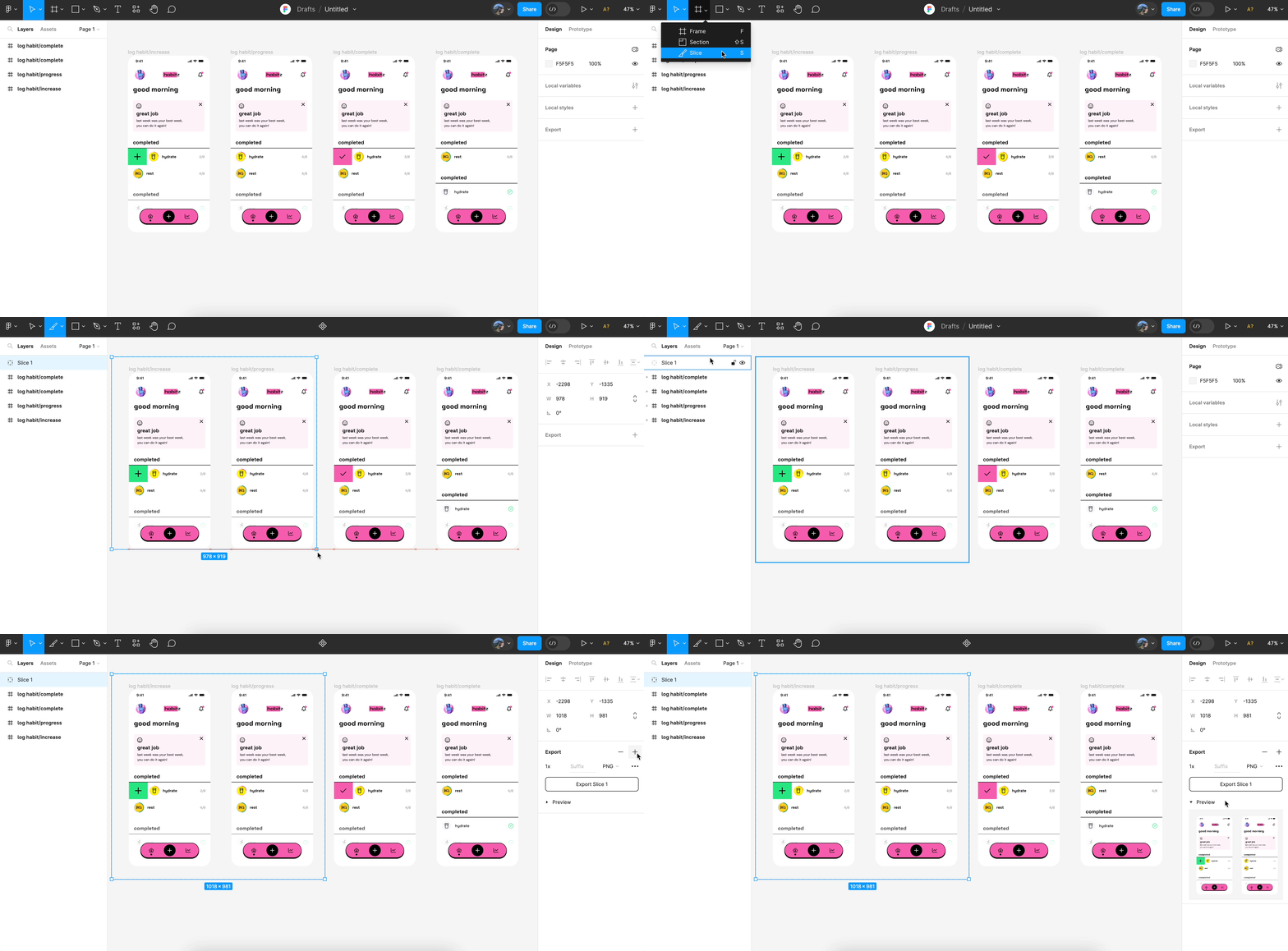
- Exporting Assets: The first step in the conversion process is exporting design assets from Figma. This includes images, icons, and other elements that will be part of the WordPress theme. Figma allows for effortless exportation in various formats (like PNG, SVG, or JPEG), thereby ensuring all elements retain their quality and scalability.
- Using WordPress Page Builders: Page builders like Elementor or Beaver Builder can facilitate the Figma to WordPress conversion. These plugins enable designers to recreate Figma layouts seamlessly in WordPress. They provide a drag-and-drop editor that mimics the Figma environment, helping designers maintain visual fidelity.
- Custom Development: For projects that require more precision and custom functionality, writing custom code may be necessary. Understanding HTML, CSS, and JavaScript will allow designers to translate Figma designs directly into a WordPress theme. This approach, although more labor-intensive, provides greater flexibility and performance optimizations.
Find out: How to Choose the Right WordPress Theme for Your Figma Design
Summary
Incorporating Figma into the WordPress web design workflow presents numerous benefits. From enhanced collaboration and efficient prototyping to streamlined asset export and responsiveness, Figma empowers designers to create outstanding websites. The transition from design to development is smoother, ensuring that the final product meets and often exceeds expectations. So, make the most of these tools for an effective project execution. This will ultimately benefit both clients and designers.
FAQs About Figma for WordPress Web Design
How does Figma help maintain design consistency?
Figma supports design systems, which allow designers to create reusable components. These components ensure consistency by maintaining uniform design elements across different pages of a WordPress site.
Can Figma prototypes be directly imported into WordPress?
While Figma prototypes themselves cannot be directly imported, the design elements and assets can be exported and recreated using WordPress page builders or custom code.
What tools can assist in converting Figma designs to WordPress?
Tools like Oxygen Builder or SeedProd are popular for translating Figma designs into WordPress layouts. They offer intuitive interfaces that align closely with Figma’s design environment.
Is coding necessary for Figma to WordPress conversion?
It depends on the complexity of the project. Page builders may handle simple designs without coding. However, custom WordPress development involving HTML, CSS, and JavaScript might be required for more intricate designs.
How can Figma improve the feedback process?
Figma’s collaborative environment lets stakeholders comment directly on design elements, speeding up feedback loops and streamlining the approval process. This interactivity helps quickly address issues and refine designs.



