


Redesigning a WordPress website can seem like a daunting task, especially if you’re striving for both functionality and visual appeal. However, with the right tools, this process can be simplified and streamlined. Enter Figma—a powerful, web-based design tool that has become a favorite among web designers for its versatility and collaboration features. This article will guide you through using Figma for WordPress website redesigns, making the process both efficient and enjoyable.
Why Redesign Your WordPress Website?
Redesigning your WordPress site can significantly impact your business, both in terms of functionality and aesthetics. By updating your site, you can stay ahead of your competition and better meet the needs of your users.

Here are several compelling reasons to consider a site redesign:
Improved User Experience
An outdated website design can lead to user frustration and decreased engagement. By revamping your website’s layout and functionality, you enhance the overall user experience. For instance, simplifying navigation and improving loading times can make the site more accessible, keeping visitors engaged longer.
Responsive Design
A redesign ensures that your site adapts seamlessly across different devices and screen sizes. For example, incorporating fluid grids and flexible images can make your WordPress site more user-friendly for mobile users, expanding your audience reach.
Enhanced SEO
A redesign is an opportunity to optimize your website for search engines. By improving site speed, refining content structure, and using SEO-friendly practices, you can boost your search engine rankings. For instance, updating meta tags and optimizing images can improve your site’s visibility on search engines like Google.
Brand Consistency
Your website should be a true reflection of your brand. A redesign ensures that your site’s look and feel align with your current brand identity across all digital platforms. For example, updating your site’s color scheme and typography to match your latest marketing materials maintains a cohesive brand image.
Increased Conversion Rates
A well-designed website is crucial for converting visitors into customers. By creating an intuitive and attractive design, you can increase user engagement and conversion rates. For example, implementing clear calls-to-action and streamlining the checkout process can lead to more successful transactions and higher sales.
Read about: Top Figma-Friendly WordPress AI Website Builders to Simplify Your Design Process
The Power of Figma in Web Design
Figma is a cloud-based design tool that is revolutionizing the way teams collaborate on web design projects. Its versatility and comprehensive suite of features make it especially effective for WordPress redesigns, enabling designers to streamline their workflow and improve project outcomes.
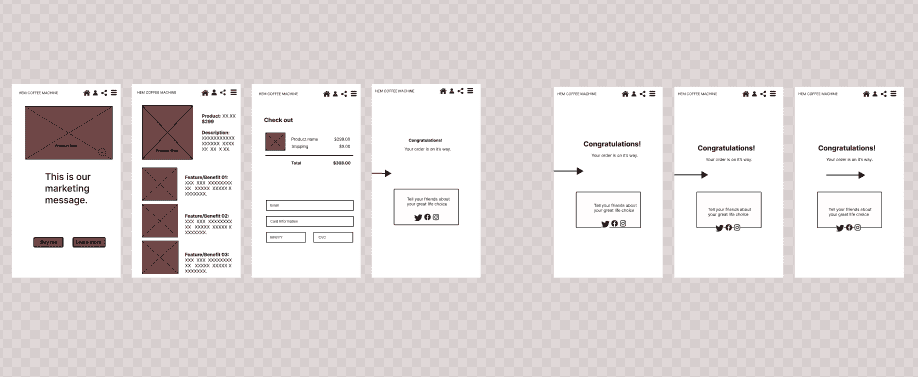
Here’s how Figma empowers web design:
Real-time Collaboration
Figma allows multiple team members to work on a design simultaneously, facilitating a seamless flow of ideas and feedback. This collaborative environment ensures that designers, developers, and stakeholders remain aligned throughout the redesign process. For example, a UX designer can make changes to a layout while a developer reviews the implications for code, all in real-time.
Scalability
With Figma, creating responsive designs is straightforward, making it easy to adjust layouts for various screen sizes. This scalability ensures that your WordPress site will look great on any device. For instance, designers can use Figma’s constraints and auto-layout features to ensure that elements resize correctly, providing a consistent viewing experience on both mobile and desktop platforms.
Expert Picks: Best UI/UX Design Trends
Prototyping
Figma offers robust prototyping capabilities, allowing designers to build interactive models that simulate the user experience before actual implementation. This feature helps identify potential usability issues early in the design process. For example, designers can create interactive buttons and dropdown menus that stakeholders can test to ensure the design meets user expectations.
Design System Integration
Figma supports the creation of design systems by enabling the use of reusable components and styles, which help establish a consistent visual language across a website. This integration is crucial for maintaining uniformity and efficiency in design projects. For example, designers can use component libraries in Figma to ensure that all buttons and input fields have a consistent appearance and behavior, streamlining the development process.
What Does Your Website Need: Redesign or Design Update
Steps to WordPress Website Redesigns Using Figma
Redesigning a WordPress website can be efficiently managed using Figma, a versatile design tool that helps streamline the process from conception to implementation. Here are the steps to guide you through a successful redesign:
Step 1: Analyze Your Current Website
Begin by assessing your existing WordPress site to pinpoint areas that need improvement. Examine aspects like load times, navigation, and overall design flow. Consider whether the current design effectively communicates your brand’s message.
Step 2: Set Clear Goals
Define specific objectives for your redesign. These goals might include enhancing user engagement, modernizing the site’s aesthetic, or improving functionality. Clearly articulated goals will serve as a roadmap throughout the design process. For instance, if a goal is to increase traffic, you might focus on improving SEO elements during the redesign.
Step 3: Research and Gather Inspiration
Research competitor websites and examine industry trends to gather design inspiration. Utilize Figma to create a mood board, collecting ideas, color schemes, and UI design elements that resonate with your vision. For example, a mood board can include a collection of color palettes and typography styles that align with your brand identity.
Learn: Why Brand Asset Management Software is Essential for Efficient Figma to WordPress Transformations
Step 4: Sketch and Wireframe
Start sketching your ideas, either on paper or directly in Figma. Develop wireframes to map out each webpage’s layout and functionality. This step is critical for visualizing the user journey and ensuring a logical flow of information. For instance, wireframes help determine where to position call-to-action buttons for maximum impact.
Step 5: Create a Visual Design
With wireframes finalized, begin designing the visual elements in Figma. Focus on typography, color schemes, and imagery that reflect your brand identity. Use Figma’s components to build a design system, maintaining consistent styling across the website. For example, using consistent button styles and layouts helps users easily recognize functional elements.
Step 6: Prototype and Test
Leverage Figma’s prototyping features to create a clickable version of your website. This allows you to test the user experience and collect feedback from stakeholders and users. Iterate on the design based on feedback to refine and enhance the site.
Step 7: Implement the Design in WordPress
After design approval, implement it in WordPress using page builders like Elementor or custom coding. Aim to replicate the Figma design as closely as possible and ensure your WordPress theme supports necessary functionalities and responsiveness.
Step 8: Conduct Final Testing
Perform thorough testing across different devices and browsers to ensure the site functions as intended. This includes checking mobile responsiveness, load times, and potential glitches.
Once testing is complete for the entire website design, launch your redesigned website and monitor its performance using analytics tools. Track user behavior, engagement, and conversion metrics to understand how the site is performing. Be prepared to make data-driven adjustments to further optimize the user experience.
Note: For a new website, fresh WordPress installation is required before you implement the Figma design.
Ultimate List: Best Figma to WordPress Agencies
Final Thoughts
Redesigning a WordPress website using Figma can be a seamless and rewarding process. With its collaborative features and intuitive design tools, Figma allows designers to create engaging and functional websites that meet business goals. By following a structured process—from analysis and prototyping to testing and implementation—you can transform your website into a powerful tool for your brand.
As digital trends continue to evolve, staying ahead with the best web design strategies is essential. Plus, leveraging tools like Figma can ensure your website remains competitive and responsive to user needs. So, take the plunge today and give your WordPress site the facelift it deserves.
FAQs About WordPress Website Redesigns Using Figma
What is Figma, and how does it help in web design?
Figma is a web-based design tool that allows designers to collaborate in real-time and create interactive prototypes. It streamlines the design process with features like scalability, prototyping, and design system integration, making it ideal for web design. Connect with our professionals for converting Figma designs to a fully functional WordPress website.
Why should I redesign my WordPress website?
Redesigning your WordPress website can improve user experience, ensure mobile responsiveness, enhance SEO, maintain brand consistency, and increase conversion rates.
How can I ensure my Figma designs translate well to WordPress?
To ensure your Figma designs translate well to WordPress, use page builder WordPress plugins or custom code to maintain design fidelity. Also, test for responsiveness and cross-browser compatibility during the implementation phase.
Is Figma suitable for beginners in web design?
Yes, Figma is intuitive and suitable for beginners. Its user-friendly interface and robust community support make it easy for new designers to learn and create professional designs.
How often should I redesign my website?
Consider redesigning your website every 2-3 years or when you notice significant changes in web design trends, user behavior, or business goals. Regular updates ensure your site remains competitive and aligned with your brand strategy. For professional Figma to WordPress conversion, it is best to make use of an expert WordPress conversion service.



