

When it comes to website design, a reliable tool can make all the difference. That’s where Figma comes in. Figma is a cloud-based design platform that’s taking the design world by storm, especially with its collaborative capabilities. But one question stands out for many budding designers: Is Figma free? In this article, we will cover everything you need to know about Figma’s free offering and decide whether it fits your design needs or if opting for a paid plan is the way to go.
What is Figma and Who Uses It?
Figma is a cloud-based design and prototyping platform that revolutionizes the way teams collaborate on digital projects. It serves as a central hub for creativity and collaboration, facilitating seamless design processes for user interfaces (UI) and user experiences (UX).

Figma operates entirely in the browser, which allows for real-time collaboration akin to Google Docs. This enables team members to work on design projects simultaneously, view changes as they occur, and engage in live communication through comments directly within the design files.
It supports the full design cycle, from initial brainstorming and wireframing to crafting interactive prototypes and establishing comprehensive design systems. With features like responsive design and vector graphics, Figma handles a wide array of design requirements.
Read: WordPress Website Redesigns Made Easy Using Figma
Who Uses Figma?
Figma is utilized by a diverse demographic, ranging from startups and freelancers to large enterprises.
- Startups benefit from Figma’s cost-effectiveness and ease of use, making it accessible to those new to professional design tools.
- Large companies rely on Figma’s robust features to ensure consistency across extensive design teams and manage complex design systems that cover multiple brands or products.
- Developers find value in Figma’s support for CSS attributes and code snippets, which aid in the transition from design to development.
Overall, Figma’s versatility and browser-based accessibility make it an essential tool for anyone involved in the design process.
Check out: Best Prototyping Tools for UI/UX Designers
Figma Stands Out: Design Tool Features and Benefits
Compared to other design tools, Figma outshines competitors with:
- Real-Time Collaboration: One of Figma’s standout features is its real-time collaboration capability. This allows multiple users to work on the same project simultaneously, with changes being visible live to all collaborators. This functionality enhances communication and streamlines the design process, reducing the need for lengthy feedback cycles.
- Version History: Figma simplifies project management through its detailed version history feature. It enables users to track the progress of their design projects over time and effortlessly revert to previous iterations if necessary. This ensures designers can experiment freely without the fear of losing valuable work.
- Versatile Use: Figma adapts seamlessly to various design requirements, from constructing simple UI kits to developing sophisticated, high-fidelity prototypes. Its versatility extends across different project types, making it an essential tool for designers who require flexibility and adaptability in their workflow.
Through these unique features and benefits, Figma has set a benchmark for modern design tools and established itself as an indispensable resource for design teams worldwide.
Convert Your Figma Designs into a WordPress Website Today!
Take your design projects to the next level by seamlessly turning your Figma creations into a fully-functional WordPress website.
Figma’s Free Plan: What’s Included
Figma’s free plan presents many possibilities for individuals and small teams keen on exploring its capabilities. Not only does it provide access to some fantastic features, but it also serves as an excellent gateway for learning and collaboration without any financial commitment.
Key Features
- Figma Editor: The editor is included for free at the core of Figma’s offerings. This enables users to create and refine design projects efficiently.
- 3 Collaborative Design Files: Users can create up to three design files to collaborate with team members. This is perfect for managing small projects or experiments.
- Unlimited Personal Drafts: Your creativity is not capped here. Even though collaborative files are limited, you can have unlimited personal drafts to explore ideas and practice your skills.
- Basic File Inspection: This feature allows you to inspect files for basic design properties, ensuring that even in the free plan, you have essential tools for managing your design elements.
Figma’s free plan is a robust offering, especially appealing to budding designers or budget-conscious professionals who want to experience real-time collaboration and leverage version history capabilities without any cost.
Expert Picks: Best Page Builders for Figma to WordPress Conversion
Free Figma: Is It Enough for Your Design Needs?
Figma’s free plan might be enough for individuals or small collaborative teams to kickstart your journey. However, as your projects grow in complexity and scale, you may find the limitations of the free plan a bit restrictive. The transition to paid plans is seamless and opens up a world of additional features that can significantly enhance your design capabilities.
Figma Pricing and Cost: All You Need to Know
Figma offers a variety of pricing plans designed to cater to the diverse needs of individuals, small teams, and large organizations. Each plan provides a unique set of features to accommodate different project scales and collaboration requirements.
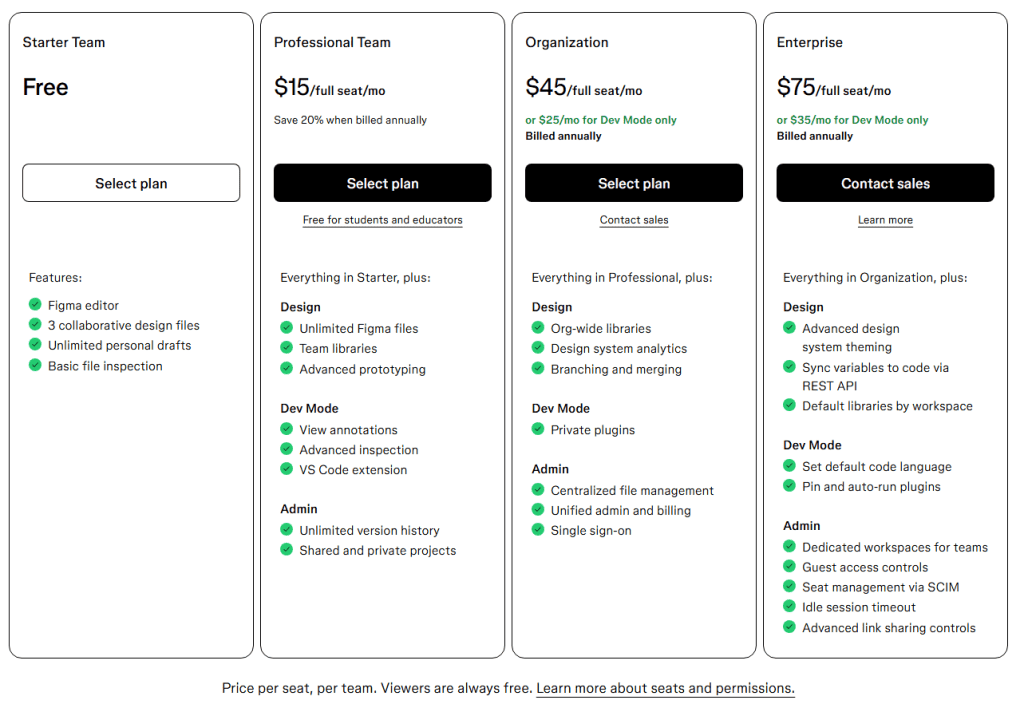
Figma Professional Plan – $15/full seat/month
The Professional Plan is tailored for freelancers and small teams, offering essential tools for more dynamic collaboration and project management.
- Design: Enjoy unlimited Figma files, access to team libraries, and advanced prototyping features.
- Dev Mode: Benefit from view annotations, advanced inspection capabilities, and a handy VS Code extension.
- Admin: Manage projects effectively with unlimited version history along with shared and private projects.
This plan expands on the capabilities offered in the Starter plan, providing advanced sharing options and enhanced control over design projects.
Know more: Best UI/UX Design Trends
Figma Organization Plan – $45/full seat/month
The Organization Plan is crafted for growing businesses that need more sophisticated tools for collaboration and design management.
- Design: Utilize organization-wide libraries, design system analytics, and branching and merging to maintain consistency and improve workflows.
- Dev Mode: Incorporate private plugins to customize and tailor your design environment.
- Admin: Streamline operations with centralized file management, unified admin and billing systems, and single sign-on for enhanced security.
This plan is for businesses looking to scale. It includes everything in the Professional plan plus features that ensure efficient project management across larger teams.
Enterprise Plan – $75/full seat/month
The Enterprise Plan is designed for large organizations requiring the highest level of control and customization.
- Design: Access advanced design system theming, sync variables to code via REST API, and set default libraries by workspace.
- Dev Mode: Customize workflows by setting default code languages and leveraging functions such as pinning and auto-running plugins.
- Admin: Benefit from dedicated workspaces for teams, guest access controls, seamless seat management via SCIM, idle session timeouts, and advanced link-sharing controls.
This comprehensive plan includes all the features from the Organization plan, plus additional tools that provide unparalleled flexibility and control, making it perfect for enterprises with complex needs.
Learn about: Best White-Label Figma to WordPress Conversion for Agencies
Figma Slides: A Game-Changer for Designers
Figma Slides represents a significant shift in how designers create and present their work. It provides an innovative way to build interactive prototypes and presentations. This feature empowers designers to showcase their projects effectively and collaborate dynamically with stakeholders.
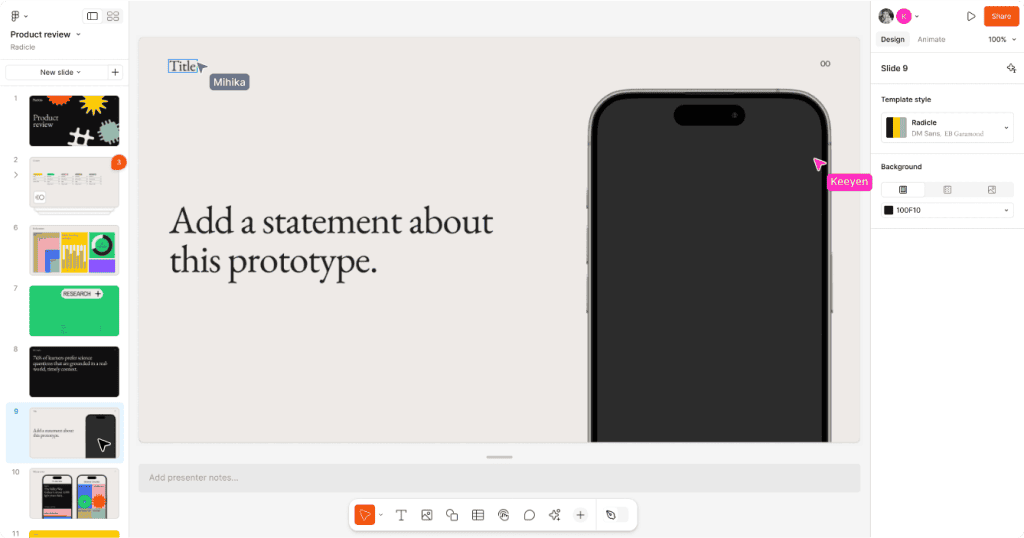
- Introduction to Figma Slides: Figma Slides is the first presentation tool crafted specifically for designers and their teams. It leverages Figma’s design prowess, making it easy for teams to co-create engaging narratives and craft incredible slide decks. Trusted by leading companies, this tool combines ease of use with the power of Figma Design, allowing everyone to participate in creating professional presentations.
- Create Presentations Like a Pro: Craft your decks using a straightforward interface, and toggle to Design Mode to access Figma’s advanced design features. With tools such as Auto Layout and a comprehensive layers panel, designing impressive presentations is seamless.
- Engage and Collaborate: Figma Slides enables building on-brand presentations with customizable templates, themes, and AI-powered writing tools. Switch effortlessly between Single Slide and Grid View to maintain a structured yet creative framework.
- Turn Presentations into Conversations: Transform static presentations into dynamic dialogues with live polls, alignment scales, and voting features. Embed live prototypes to enhance interactivity and allow stakeholders to experience designs firsthand.
Find out: How to Migrate a Site from Figma to WordPress
Figma Slides Features
Here are the six features of Figma Slides:
- Showcase Interactive Designs: Embed playable prototypes to animate your ideas.
- Grid View for Perspective: View and organize your entire presentation easily.
- Design Mode Access: Utilize Figma’s design tools for enhanced customization.
- AI-Driven Copy Refinement: Adjust text tone and length quickly with AI tools.
- Team Alignment Tools: Use the Alignment Scale to ensure team consensus on ideas.
- Presenter View Enhancement: Access presenter notes and slide previews for smooth delivery.
Dev Mode: Unlocking Figma’s Full Potential
Dev Mode is an advanced feature in Figma that provides designers with tools to significantly enhance and expand their design projects. By facilitating the creation of interactive prototypes and enabling seamless collaboration between designers and developers, Dev Mode is a transformative addition for those aiming to elevate their work.
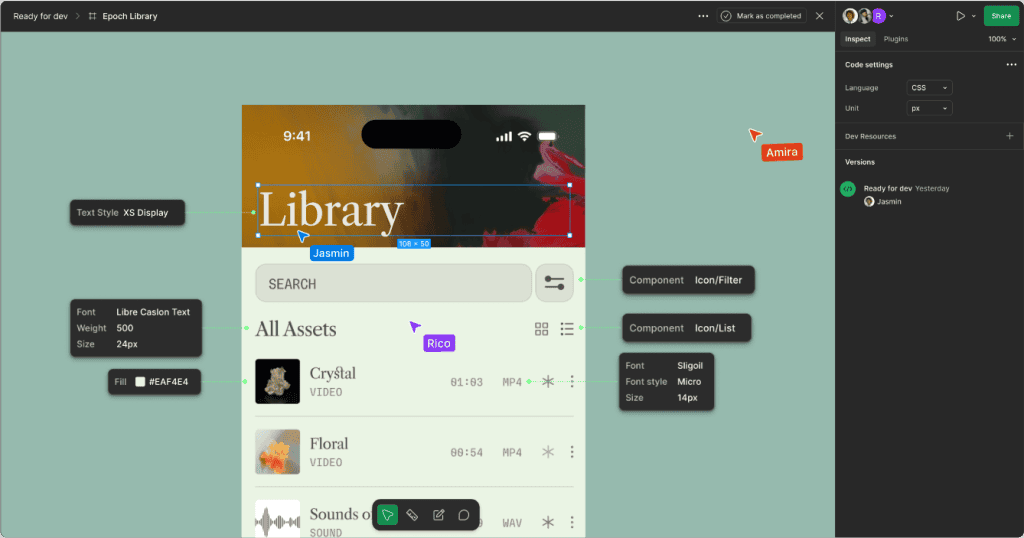
- Introduction to Dev Mode: Dev Mode bridges design and development, streamlining workflows and ensuring design intent is consistent throughout the development process. This feature empowers design teams to optimize their project pipelines, making the transition from concept to implementation more effective.
- Enhancing Interactivity: With Dev Mode, designers can create highly interactive prototypes, allowing stakeholders to experience the design as if it were functioning in a live environment. This capability ensures that developers accurately convey and understand every detail, minimizing the risk of misinterpretations.
- Facilitating Collaboration with Developers: One of the standout aspects of Dev Mode is its ability to foster better collaboration between designers and developers. By providing developers with precise specifications, code snippets, and asset exports, both teams can work more efficiently and cohesively. This reduces the time spent on back-and-forth clarifications and enhances overall productivity.
- A Game-Changer for Design Projects: For designers aiming to push the boundaries of their projects, Dev Mode offers the tools necessary to achieve new levels of refinement and professionalism. Whether working on simple apps or complex digital experiences, this feature allows for greater precision and innovation, truly unlocking Figma’s full potential.
Also read: Is WordPress Really Free for Website Owners Planning for Figma Design Conversion
Conclusion
Figma is a powerful tool that caters to a wide range of designers, from amateurs to seasoned professionals. While the free plan provides a basic yet compelling introduction to its capabilities, investing in Figma’s paid plans could be vital for unlocking its full potential, especially for complex design environments. Whatever path you choose, Figma’s focus on collaboration and innovation ensures you are well-equipped for your design endeavors.
FAQs About Is Figma Free
Is Figma free for personal use?
Yes, Figma offers a free plan that is suitable for personal use. It includes basic features such as three collaborative files and unlimited personal drafts.
Do I need to pay to use Figma?
Figma’s basic plan allows you to use it for free. However, to access advanced features and capabilities, you need to subscribe to a paid plan.
What is Figma for students?
Figma provides educational access to students through its Education Plan. This plan offers all the features available in the Professional plan for free to eligible students and educators.
What are the limitations of the free version of Figma?
The free version limits users to three collaborative files, and while it allows unlimited personal drafts, advanced features like team libraries and enhanced prototyping tools are reserved for paid plans.
Can I use Figma free for commercial use?
Yes, the free version of Figma can be used for commercial purposes. However, the additional features in paid plans might be beneficial for more complex commercial projects.



