When it comes to e-commerce, creating an engaging and user-friendly product page is essential for success. WordPress is a powerful platform for building e-commerce websites via the WooCommerce plugin, and Figma is a versatile design tool. With these tools, you can craft product pages that not only look great but also convert visitors into customers. This article will provide tips and insights on how to achieve E-commerce product page success using WordPress and Figma, guiding you through design principles, user experience enhancements, and conversion rate optimization techniques.
E-Commerce Product Page Design
The product page is the heart of any e-commerce website. It serves as the storefront where potential buyers gather information, assess options, and make purchasing decisions. A well-designed product page can significantly impact the buying process, leading to higher conversion rates and increased sales.
Utilizing WordPress to build the e-commerce infrastructure provides flexibility and extensive plugin support, while Figma empowers designers to create visually stunning and responsive layouts. Successfully blending these tools can lead to successful e-commerce outcomes.
Design a Conversion-Oriented E-Commerce Product Page
Let us help you design a product page that captures attention, builds trust, and encourages action. Contact us today to start designing a product page!
Tips for E-Commerce Product Page Success with Figma and WordPress
Creating an engaging e-commerce product page is crucial for driving sales and enhancing user experience. As such, here are some essential tips to achieve success with this powerful combination.
Tip #1: Designing for Maximum Engagement
Crafting a product page that captures attention and encourages interaction is essential for success. To maximize engagement and conversions, focus on visual hierarchy, simplicity, clarity, and consistent branding.
Focus on Visual Hierarchy
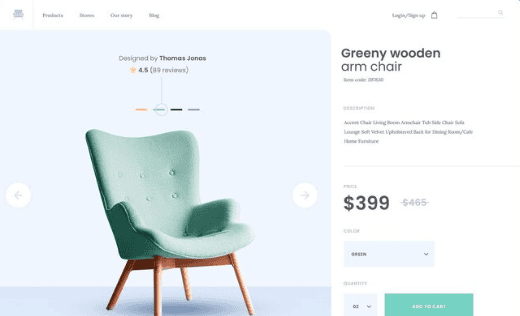
Use size, color, and placement to direct the user’s attention to crucial details like product titles, prices, and call-to-action buttons. For example, make the price bold and in a contrasting color to make it easily noticeable. Also, integrate features like zoom or 360-degree views to improve the visual appeal of your products. For instance, offering a 360-degree view of a shoe allows customers to see it from every angle, encouraging confidence in their purchase.
Simplicity and Clarity
Design clean, simple layouts that make it easy for users to find necessary information. For example, a product page with neatly organized sections for description, features, and reviews aids in user navigation. In addition, leverage white space to separate different elements. This will provide breathing room and enhance focus on key elements. Example, separating product details from customer reviews with ample margins.
Consistent Branding
Ensure the design of product pages reflects your overall brand style by using consistent colors, fonts, and design elements. For example, if your brand uses a specific shade of blue, incorporate it into your buttons and headings. Lastly, keep your brand message apparent in product descriptions and images. Use consistent tone and style in both the written copy and visuals to reinforce the brand narrative throughout the page.
Read about: The Impact of Color Theory in Figma to WordPress Conversions
Tip #2: Enhancing User Experience (UX)
A seamless and enjoyable user experience is key to retaining visitors and facilitating successful conversions. To elevate the UX on your e-commerce product pages, focus on responsive design, intuitive navigation, and speed optimization.

Responsive Design
Ensure your product pages adapt smoothly to various devices, acknowledging that mobile traffic is a major component of e-commerce activity. For instance, a responsive design allows a product image gallery to resize correctly on smartphones and tablets.
Furthermore, use Figma’s responsive design features to create layouts that adapt to different screen sizes. This enables you to test and refine designs for optimal performance. For example, test how a two-column layout adjusts on smaller screens to maintain readability and visual appeal.
Also read: Role of Figma in Building Mobile-Responsive WordPress Websites
Intuitive Navigation
Implement navigational aids that help users effortlessly explore your site, ensuring a logical and straightforward journey. For example, use a sticky top navigation bar with clear categories and breadcrumb trails to show users where they are on the site.
You can also encourage additional purchases by displaying related items or upselling options directly on the product page. For example, to entice bundled purchases, show accessories or complementary products to a laptop, such as a carrying case or mouse.
Speed Optimization
Optimize images and scripts to reduce page load times, enhance user satisfaction, and boost conversion rates. Use image compression tools to decrease file size without losing quality. In addition, implement caching plugins to improve site performance and reduce server load. This can significantly enhance the browsing experience, especially during high-traffic periods.
Related: Advanced Tips for Improving Website Speed After Figma to WordPress Conversion
Tip #3: Conversion Rate Optimization Techniques
To boost conversions on your e-commerce product pages, it’s essential to use these strategies:

Compelling Call-to-Action (CTA)
Ensure your CTAs are visually striking and encourage action through strategic wording and contrasting colors. For instance, a button that says “Buy Now” in a bold red color can draw attention and entice users to click. Also, position CTAs in prominent locations, such as near product images or descriptions, where users naturally focus their attention. Example, placing an “Add to Cart” button directly below the product price can make the purchase process more intuitive.
Trust Signals
Feature genuine customer reviews and ratings to build trust and influence potential buyers. Displaying a star rating system with customer testimonials can reinforce the quality and reliability of the product. Likewise, provide transparent return policies, security seals, and detailed shipping information to alleviate customer concerns. For instance, a “30-Day Money-Back Guarantee” badge can reassure customers and reduce hesitation.
A/B Testing
Continuously experiment with various elements of your product pages to identify what works best. Use Figma to prototype different designs and test their effectiveness. For example, try variations of CTA colors, button text, or image placements to see which version yields higher conversions.
You can also leverage WordPress’s analytics tools to monitor performance metrics and adjust strategies accordingly. Analyzing data such as bounce rates and user engagement can provide insights for making data-driven improvements to your product pages.
Know more: Role of A/B Testing in Figma to WordPress Conversion Projects
Tip #4: Integrating Figma with WordPress
Combining Figma’s design capabilities with WordPress’s development power can greatly enhance the creation process of e-commerce product pages, streamline workflows, and maintain design integrity.
Design Prototyping
Use Figma’s prototyping features to build interactive models of your product pages. This allows stakeholders to review and provide feedback before development begins. For example, you can simulate user interactions by creating clickable prototypes that mimic the real navigation flow.
Next, ensure a smooth transition from design to development by exporting assets from Figma in formats that WordPress can easily utilize. For instance, export images and icons in SVG or PNG formats for optimal quality and compatibility.
Collaboration Tools
Utilize Figma’s robust collaboration features to keep all team members, from designers to developers, aligned. This can speed up the design process and enhance creativity. For example, designers and developers can work simultaneously on a project while providing instant feedback through comments.
Also, use Figma’s comments and version history to document design changes and decisions, ensuring transparency and accountability. This can help resolve any disagreements quickly and ensure the project stays on track.
Page builder plugins like Elementor, SeedProd, or WPBakery Page Builder can bridge the gap between design and deployment, offering greater design control directly within WordPress. These tools allow non-developers to implement sophisticated design elements in a user-friendly environment.
Learn: Figma to WordPress Solutions for E-commerce
Summary
A successful e-commerce product page design on Figma and enhanced with WordPress can significantly impact your online sales. By focusing on design principles that maximize engagement, enhance user experience (UX), and optimize conversion rates, you create a powerful platform for potential buyers.
Integrating Figma with WordPress paves the way for an efficient design-to-development workflow, resulting in visually compelling and high-performing e-commerce websites. Lastly, always keep testing and iterating to refine the user experience. This will help foster growth and success in the competitive digital marketplace.
FAQs About E-Commerce Product Page Design
How does Figma enhance the design process compared to other tools?
Figma offers real-time collaboration, responsive design features, and seamless integration with other tools. This makes it a preferred choice for teams working on e-commerce websites.
Why is responsive design important for e-commerce websites?
Responsive design ensures that your website looks and performs well on all devices, which is crucial as more users shop on mobile devices.
How can I track the success of my product pages?
Analytical tools like Google Analytics can help you monitor user behavior, track conversions, and identify areas for improvement on your product pages.
What plugins do you recommend for optimizing load times on WordPress?
Plugins like W3 Total Cache and WP Super Cache are excellent choices for improving site speed and enhancing user experience.
Can Figma designs be directly used on WordPress websites?
No. Figma designs need to be converted into web-compatible formats to ensure your designs are accurately represented on WordPress.