In this Elementor vs Gutenberg article, we’ll compare Gutenberg and Elementor to determine which page builder best complements Figma designs, ensuring a seamless transition from design to development without compromising creativity or efficiency.
Choosing the right page builder is crucial when converting Figma designs to WordPress sites. Elementor and Gutenberg are two of the most popular options, each offering unique advantages. While Gutenberg provides a lightweight, block-based approach, Elementor delivers advanced design flexibility with its drag-and-drop editor.
Both tools help designers bring their Figma layouts to life, but the choice depends on factors like customization, ease of use, and performance.
Introduction to Page Builders and Block Editors
Page builders and block editors are essential tools for website development. They simplify the process by providing an intuitive drag-and-drop interface. This allows users to create custom layouts, add features, and design WordPress websites without coding knowledge. These tools have revolutionized website development, making it accessible for non-technical users to build professional websites.
Importance of Choosing the Right Page Builder
Choosing the right page builder plays a vital role in creating a high-performing WordPress website. It directly impacts design flexibility, website speed, and overall functionality.
- Effect on Website Speed and Performance: A well-optimized page builder ensures faster load times. This improves user experience and SEO rankings. Poorly coded builders can slow down a website, affecting performance.
- Influence on User Experience: A user-friendly page builder makes website creation easier. It allows smooth navigation and a visually appealing layout, which enhances visitor engagement and retention.
- SEO and Compatibility with WordPress Plugins: The right page builder should generate clean code, support SEO best practices, and integrate seamlessly with essential WordPress plugins and themes.
Also read: How to Maximize SEO Performance in Figma to WordPress Conversions
Choose a Page Builder & Let’s Build Your WordPress Site!
Whether you prefer Gutenberg for its simplicity or Elementor for its advanced features, we’re here to seamlessly convert your Figma designs into a fully functional WordPress website.
What is Gutenberg and its Key Features?
Gutenberg is the default WordPress page builder, introduced in 2018 to replace the Classic Editor. It is a free, open-source block editor with a user-friendly drag-and-drop interface. Gutenberg is easy to use for beginners and offers a variety of blocks to create content efficiently.
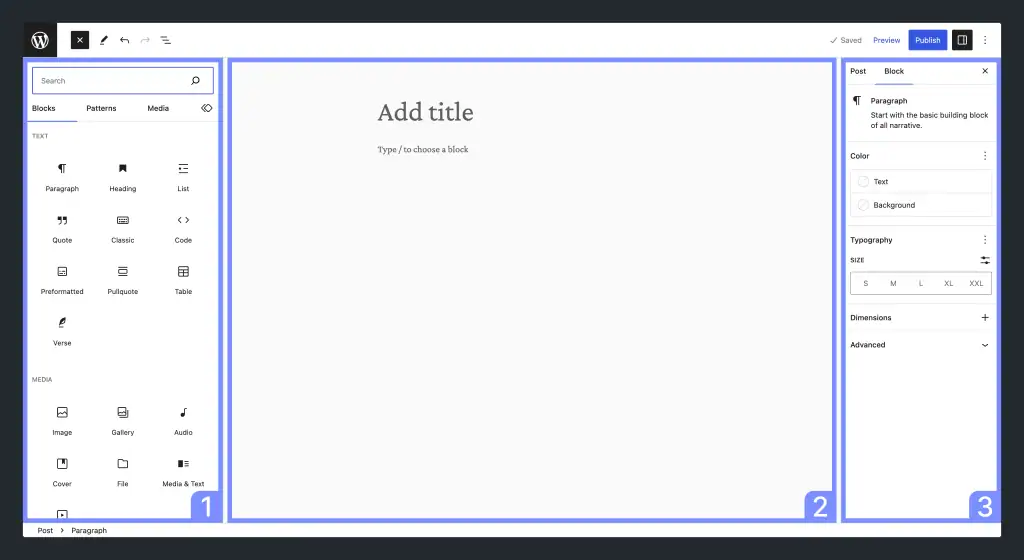
- Gutenberg Blocks and Customization Options: As a default WordPress block editor, Gutenberg blocks are reusable content elements that can be added to a page or post. These include text, image, video, and audio blocks. Users can customize blocks using the block editor’s settings and options.
- Gutenberg Page Building Process: Building a page with Gutenberg involves adding and customizing blocks. Users can select blocks from the library or create custom blocks. The drag-and-drop editor allows easy arrangement of elements.
Gutenberg Editor is Best For
Beginners who want a simple and free page builder. Gutenberg’s block editor is user-friendly and requires no additional cost, making it ideal for beginner WordPress users.
- Users looking for a lightweight editor with good performance: Since Gutenberg is built into WordPress, it ensures fast performance without extra plugins slowing down the website.
- Those who prefer a block-based approach: Gutenberg’s block-based structure makes content organization easier while maintaining a clean and minimal design.
Step-by-Step Guide: How to Create Gutenberg Blocks Based on Figma Designs
What is Elementor Page Builder and its Key Features?
Elementor is a popular WordPress page builder plugin with a robust user interface. It provides a powerful drag-and-drop editor, widgets, and templates. Elementor is designed for ease of use but also offers advanced features for experienced users.
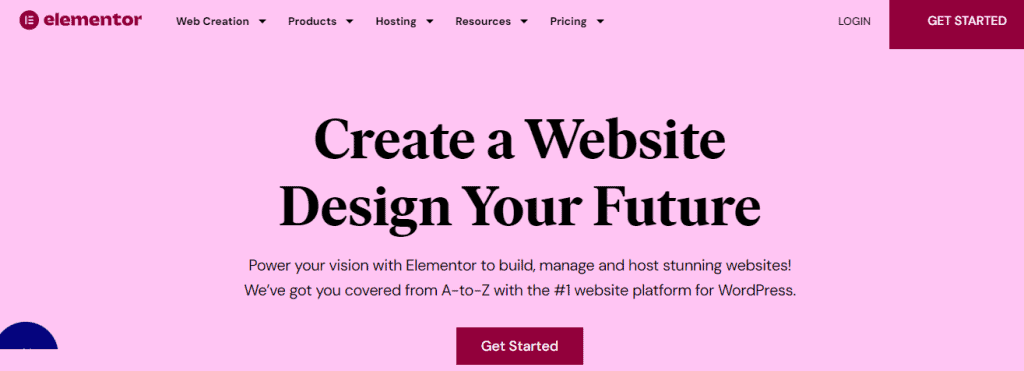
Elementor offers both free and paid versions. The free version provides basic features, while the Pro version includes advanced customization options and premium support. Elementor Pro is ideal for developers and designers who need more flexibility.
Elementor is Best For
Users who require advanced customization options. Elementor offers extensive design controls, animations, and styling features, giving users more creative freedom.
- Designers and developers looking for a feature-rich builder: With pre-built templates, widgets, and third-party integrations, Elementor is ideal for professionals who need advanced design capabilities.
- Websites that need complex layouts and interactive elements: Elementor’s drag-and-drop interface allows for intricate page structures, interactive elements, and highly customized designs.
Beginner’s Guide: How to Convert Figma Designs to WordPress Using Elementor
Gutenberg vs Elementor: A Comparison
Gutenberg and Elementor are two powerful page builders for WordPress, each catering to different user needs. Understanding their usability, performance, customization, and SEO differences can help you choose the right tool.
User Interface and Ease of Use
A smooth and intuitive interface is essential when choosing a page builder, especially for users with little to no coding experience.
Gutenberg: Simplicity and Integration
Gutenberg is the default WordPress editor. It provides a clean, minimalistic interface that blends seamlessly with the WordPress dashboard. It also uses a block-based system where users can add and arrange content effortlessly. Gutenberg’s simplicity makes it ideal for beginners who want a straightforward editing experience without additional plugins.
Elementor: Feature-Rich but Requires Learning
Elementor is a popular page builder plugin that offers a more advanced drag-and-drop interface with a wide range of widgets, templates, and customization options. While its features provide greater design flexibility, it can feel overwhelming for first-time users. However, once mastered, Elementor allows for highly detailed and visually appealing website designs.
Final Verdict: If you prefer a simple, integrated experience with minimal effort, Gutenberg is the best choice. However, if you need a feature-rich environment with advanced customization, Elementor is worth the learning curve. The decision depends on your design needs and how much time you’re willing to invest in mastering the tool.
Read about: Figma-Friendly WordPress AI Website Builders
Performance and Impact on Page Speed
Website performance and loading speed are crucial factors for user experience and SEO. A well-optimized page builder ensures faster load times, which reduces bounce rates and improves rankings.
Gutenberg: Lightweight and Optimized
Gutenberg is built into WordPress, meaning it follows WordPress’s coding standards and maintains a lightweight framework. It generates clean and minimal code, leading to faster page loads without requiring additional plugins. Since it integrates natively with WordPress and WordPress themes, it also ensures better performance with minimal impact on speed.
Elementor: Powerful but Can Be Heavy
Elementor offers extensive design flexibility, but its added features and reliance on extra scripts can slow down websites if not optimized correctly. To maintain performance of landing pages, users often need caching plugins, content delivery networks (CDNs), and image optimization tools. With proper setup, Elementor-powered websites can still achieve high-speed performance, but it requires extra effort.
Final Verdict: For optimal speed and performance, Gutenberg is the better choice due to its lightweight structure and seamless WordPress integration.
Check out: How to Optimize Figma Designs for WordPress Page Speed and Performance
Pricing and Value for Money
When selecting a page builder, pricing plays a crucial role, especially for small businesses, freelancers, and bloggers. While both Gutenberg and Elementor offer free versions, Elementor’s premium features come at a cost.
Gutenberg: 100% Free and Built-In
Gutenberg is completely free and comes pre-installed with WordPress, making it a cost-effective option. There are no hidden fees or premium upgrades. Users can expand its functionality through third-party plugins, but the core experience remains free. This makes Gutenberg ideal for budget-conscious users who need a simple yet effective website editor.
Elementor: Free vs Pro Versions
Elementor offers both free and premium versions. The free version includes essential features like drag-and-drop editing and basic widgets, but advanced functionality is locked behind Elementor Pro.
The Pro version, which starts at $84 per year, includes premium widgets, theme builder capabilities, pop-ups, and enhanced design flexibility. For businesses and professional designers, this investment can be worthwhile.
Final Verdict: If you’re looking for a cost-free solution with decent functionality, Gutenberg is the best choice. However, if you need advanced customization, templates, and premium support, Elementor Pro is worth the investment.
Find Out: Is Figma Free for Your Design Needs
Advanced Features and Customization Options
Customization and advanced features are essential for creating unique, high-performing websites.
Gutenberg: Developer-Friendly Customization
Gutenberg allows experienced website developers to modify blocks using the render_block hook, enabling additional styles and functionality without altering core WordPress code. Users can also enhance their sites with block-based plugins, reusable blocks, and block patterns. However, while Gutenberg offers basic customization, it requires custom CSS or additional plugins for more advanced styling while creating pages.
Elementor: Extensive Customization & Add-ons
Elementor provides in-depth customization options for every page element. Users can tweak typography, animations, spacing, and colors without coding.
The Pro version also extends functionality with a theme builder, motion effects, and integrations with marketing tools. Further, Elementor supports third-party add-ons, expanding its capabilities beyond the built-in features.
Responsive Design and Live Editing
Both Gutenberg and Elementor offer responsive design options. Gutenberg’s approach is minimalistic, with simple mobile previews and column adjustments. Elementor, however, provides a highly interactive live editing experience, allowing users to tweak designs in real-time for different screen sizes.
Final Verdict: If extensive customization is a priority, Elementor is the superior choice. It provides complete design control, advanced styling, and third-party integrations.
Complete Guide: Steps to Streamline WordPress Theme Customization with Figma
Converting Figma Designs to WordPress Pages with Gutenberg and Elementor
Both Gutenberg and Elementor offer different approaches for page building.
Gutenberg: Block-Based Approach
Gutenberg follows a block-based structure, where users can select from a variety of pre-made blocks, such as text, images, buttons, and galleries. Customization is possible through block settings and additional styling using CSS.
While Gutenberg does not offer direct design-to-code conversion, third-party plugins like Kadence Blocks can help bridge the gap on the WordPress platform. Developers may also need to create custom blocks to match complex Figma designs precisely.
Elementor: Widget-Based Approach
Elementor builder features a more visual and flexible approach by using widgets instead of blocks. Users can drag and drop page editor and pre-designed widgets or build custom widgets to match Figma designs.
The Pro version includes a theme builder, dynamic content, and pixel-perfect customization, making it easier to replicate Figma layouts during web development. Additionally, Elementor supports direct Figma to WordPress conversion through third-party plugins.
Final Verdict: For complex, highly customized pages, Elementor is the superior option.
Impact on Website Speed and SEO
The page builder you choose can directly affect your site’s performance and optimization efforts.
How Gutenberg Affects Website Speed and SEO
Gutenberg is a core WordPress feature, meaning it is a lightweight, default editor optimized for performance. It generates clean, minimal HTML and requires fewer resources, leading to faster page load times.
Since it integrates directly with the standard WordPress system as a default block editor, there is no need for extra scripts or heavy styling, reducing the chances of performance issues. Its efficient code structure also makes SEO optimization easier, contributing to better rankings.
How Elementor Affects Website Speed and SEO
Elementor, while powerful, adds extra scripts, CSS, and JavaScript files, which can increase page load times. The more widgets and effects you use, the more resources the website requires.
However, with proper optimization, Elementor sites can still achieve good speed and SEO performance. Elementor Pro also offers features like schema markup, custom meta tags, and integrations with SEO plugins like AIOSEO, enhancing optimization potential.
Final Verdict: If SEO and site speed are top priorities, Gutenberg should be your preferred option.
Customer Support and Community
Both Gutenberg and Elementor offer resources, but the level of direct support varies.
Gutenberg’s Customer Support and Community
Gutenberg does not have dedicated customer support since it is an integral part of WordPress. However, it has a strong community of developers and users who actively contribute to forums, documentation, and tutorials. WordPress.org also provides an extensive knowledge base and users can seek help from community discussions.
Elementor’s Customer Support and Community
Elementor offers a structured support system with a detailed knowledge base, community forums, and video tutorials.
Free users can access community support, while Elementor Pro users receive premium support, including email assistance from the official support team. The Elementor community is also highly active on social media, forums, and YouTube, where users can find solutions, tips, and advanced tutorials.
Final Verdict: If you prefer a structured support system with direct assistance, Elementor (Pro version) is the better choice. However, if you are comfortable relying on community-driven support and free tutorials, Gutenberg provides enough resources to troubleshoot most issues.
To Sum Up
Both Gutenberg and Elementor offer unique advantages when converting Figma designs into WordPress pages. Gutenberg is a lightweight, built-in solution that ensures fast performance and seamless integration. It is ideal for simple designs and structured layouts.
On the other hand, Elementor provides extensive customization, interactive elements, and a true drag-and-drop experience, making it perfect for complex, design-heavy websites.
The right choice depends on your project needs—whether you prioritize speed & simplicity or advanced design flexibility. By understanding their strengths, you can select the best page builder to bring your Figma designs to life on WordPress.
Elementor vs Gutenberg FAQs
Is Gutenberg better than Elementor?
It depends on your requirements. Gutenberg is great for simplicity, while Elementor offers more design flexibility.
Can I use both Gutenberg and Elementor?
Yes, you can use both together, though choosing one for consistency is best.
Is there a better option than Elementor?
There are other page builders like Divi, SeedProd, and Beaver Builder, but Elementor remains one of the most popular choices.
Can I switch from Elementor to Gutenberg?
Yes, but it may require rebuilding pages, as Elementor elements do not transfer directly to Gutenberg.