Since today’s businesses need agile and focused marketing strategies, building microsites is one powerful way to achieve this. Unlike a large website that caters to multiple audiences, a microsite is a small, standalone site designed for a specific purpose, whether it’s a campaign, a product launch, or an event.
With WordPress, creating a microsite becomes simple, cost-effective, and highly customizable. This guide will walk you through what a microsite is, its benefits, and a step-by-step process to create and manage one using WordPress. If you are a beginner exploring this concept for the first time, this article will give you everything you need to get started.
What Are Microsites?
A microsite is a small website that operates independently from your primary domain. It can exist on a separate domain name or as a subdomain of your main site (for example, campaign.yourbrand.com).

Unlike a landing page, which is typically a single page, a microsite can have multiple pages that provide in-depth information.
For instance:
- A clothing brand might create a microsite for a new summer collection.
- A tech company might launch a microsite for a product demo or event.
- A nonprofit could build a microsite for a specific fundraising campaign.
Microsites are highly effective in digital marketing because they let you focus on one clear objective, such as awareness, lead generation, or sales, without distractions from the main site.
Get a Custom WordPress Microsite Designed for Maximum Engagement and Improved Visibility
We can help you create a tailored microsite with focused content, seamless & responsive design, and optimized performance.
Benefits of Creating Microsites with WordPress
Using WordPress to build microsites offers flexibility and control, even if you are not a developer. Here are the key advantages:
- Focused Marketing: Microsites allow you to speak directly to a niche audience. You can tailor the content, visuals, and calls-to-action to match a specific campaign or product.
- Stronger Brand Engagement: By designing unique experiences, you can build credibility and encourage higher engagement. For example, Red Bull frequently uses campaign-specific microsites to connect with young audiences.
- SEO Advantages: Since microsites often target a single theme, they can rank well for specific keywords. Having a dedicated URL with optimized content improves visibility on search engines.
- Flexibility and Creativity: Microsites don’t have to follow the exact structure of your main site. This gives you creative freedom to experiment with layouts, storytelling, and user experiences.
- Performance Testing: They are also excellent for testing new ideas. You can run A/B tests on designs or CTAs without impacting the performance of your primary website.
The Role of Figma in Creating a Microsite in WordPress
Before diving into WordPress, it’s helpful to map out your microsite design in Figma. Figma is a collaborative design tool that lets you create wireframes, prototypes, and UI layouts without coding.

By planning in Figma, you can:
- Visualize the layout of your microsite (homepage, landing pages, CTAs, forms).
- Experiment with colors, typography, and branding before implementing them in WordPress.
- Collaborate with teams or clients to gather feedback early in the process.
- Speed up development by handing off design assets and specifications directly to developers or WordPress builders.
For example, you could design your microsite homepage in Figma, test different CTA placements, and only then replicate the approved version in WordPress using a page builder like Elementor or Gutenberg. This avoids trial-and-error during the build stage and ensures consistency with your brand identity.
Steps to Create a Microsite in WordPress
Now, let’s break down the process of creating a microsite in WordPress step by step.
Step 1: Planning Your Microsite
Before building, you need a clear plan. Ask yourself:
- What is the goal? Is it lead generation, brand awareness, event promotion, or product launch?
- Who is the target audience? Use tools like Google Analytics, Facebook Insights, or surveys to define them.
- What keywords should you target? Conduct keyword research to identify search terms that align with your microsite’s theme.
Example: If you are promoting a new vegan skincare line, your microsite keywords might include “vegan skincare microsite,” “organic skin products online,” or “cruelty-free skincare launch.”
Step 2: Choosing a Domain or Subdomain
When setting up a microsite in WordPress, one of the first decisions you’ll face is whether to use a separate domain or a subdomain. This choice directly impacts your branding, SEO strategy, and overall campaign goals.
Domain mapping systems play a key role here, as they determine how your microsite connects to your main website. Let’s explore both options to help you decide.
Separate Domain
A separate domain, such as newproduct.com, gives your microsite a completely independent identity. This approach is ideal if you want your campaign to stand apart from your main brand.
- Pros: It allows stronger branding opportunities and can improve SEO visibility since the site stands alone.
- Cons: However, it requires new domain registration and hosting, which means additional cost and management.
Subdomain
A subdomain, such as product.yourbrand.com, keeps the microsite connected to your main brand. It is quicker to set up and easier to maintain.
- Pros: It’s simple, cost-effective, and leverages your existing domain authority.
- Cons: On the downside, it may not achieve the same SEO independence as a separate domain.
In short, both options work well. But if your campaign needs a unique identity and stronger SEO presence, choosing a separate domain is the better route.
Step 3: Setting Up WordPress
After choosing whether to use a domain or a subdomain, the next step is setting up WordPress. This stage lays the foundation for your microsite and ensures it is ready for customization and content.
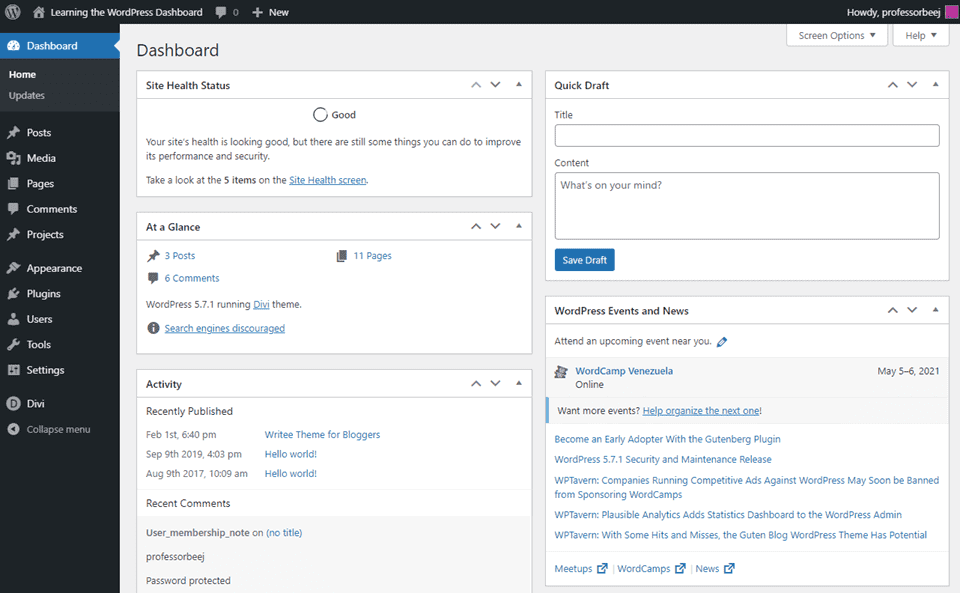
WordPress makes the process straightforward, especially when paired with the right hosting provider and plugins. Let’s break it down step by step.
WordPress Installation: First, install WordPress on your hosting provider. Popular choices like Bluehost, InMotion, DreamHost, or WP Engine make installation simple and beginner-friendly. Many providers even offer one-click WordPress setups to save time.
Add Essential Plugins to Your Site: Next, strengthen your microsite with key plugins such as:
- WP Landing Kit allows you to map custom domains for your microsite.
- Elementor or Beaver Builder drag-and-drop builders that simplify page design without coding.
- AIOSEO ensures your microsite is optimized for search engines from day one.
These tools help you create a professional, functional site with minimal effort.
Configure DNS Records: Finally, configure your DNS records to point your chosen domain or subdomain to the microsite. This step ensures visitors can reach your site easily and connect it seamlessly to your brand’s online presence.
In summary, setting up WordPress is a straightforward process, but choosing the right hosting, plugins, and DNS setup ensures your microsite runs smoothly from the start.
Step 4: Building the Microsite
With WordPress set up, it’s time to build pages.
- Homepage: Highlight your main offer or campaign message.
- About Page: Explain the story or purpose behind the microsite.
- CTA Page: Include lead capture forms, signup forms, or purchase buttons.
WordPress makes this easy with the Block Editor (Gutenberg) or page builders. You can also manage multiple microsites under a WordPress Multisite setup, which is ideal for agencies handling several campaigns.
Example: Coca-Cola used microsites to promote seasonal campaigns, each with unique visuals and calls-to-action.
Step 5: Designing Your Microsite
Design plays a crucial role in how users experience your microsite. A well-designed microsite should balance creativity with usability, ensuring it is both visually appealing and easy to navigate. Let’s look at the key elements to focus on.
- Keep It Mobile-Friendly: Since most visitors will browse from smartphones, prioritize a responsive design that adapts seamlessly to smaller screens.
- Maintain Brand Consistency: Use your brand’s fonts, colors, and tone across the microsite. This keeps the experience familiar while reinforcing your identity.
- Use Engaging Visuals: Incorporate interactive elements like videos, sliders, or quizzes. These enhance engagement but should be used sparingly to avoid clutter.
- Simplify Navigation: For clarity, stick to 2 to 5 core pages. Simple navigation ensures visitors can quickly find the information they need.
- Explore Templates: Finally, explore microsite templates from WordPress theme marketplaces like SeaThemes to speed up the design process and ensure consistency.
Expert Guide: How to Integrate Figma Interactive Components into WordPress
Step 6: Creating Content for Your Microsite
Content is the backbone of every microsite. Since these sites are usually small, the content must be concise, engaging, and tailored to the campaign’s purpose. The right words and visuals will capture attention and guide visitors toward your call-to-action. Here are the key elements to focus on.
- Write Clear Headlines: Start with short and attention-grabbing headlines. Headlines should communicate your core message instantly and encourage users to explore further.
- Tailor Content to Your Audience: Create content that directly addresses your audience’s needs and pain points. Use insights from surveys, analytics, or customer feedback to ensure relevance.
- Optimize with Keywords: Integrate LSI keywords naturally, such as “microsite marketing campaign,” “WordPress microsite examples,” or “mini websites for brands.” This strengthens SEO and helps your microsite rank for specific terms.
- Enrich with Visuals and Examples: Add visuals, case studies, and FAQs to make your content engaging and informative. These elements provide clarity and establish trust.
- Curate Fresh Content: Consider using tools like WP RSS Aggregator to curate industry updates or related news, keeping your microsite fresh and dynamic.
In short, strong content makes your microsite valuable and ensures it resonates with your target audience.
Find out: How to Create a Project Front Page Design with Figma
Step 7: Launching and Promoting Your Microsite
After building and designing your microsite, the final step is to launch it effectively. A successful launch ensures your microsite reaches the right audience and delivers measurable results.
This process usually involves testing, promotion, and performance tracking. Let’s break it down.
Start with a Soft Launch: Begin with a soft launch by sharing your microsite with a small group of users. This allows you to identify bugs, fix design issues, and refine your content before opening it to a wider audience.
Move to a Full Launch: Once refined, move forward with a full launch. Promote your microsite through multiple channels, such as:
- Social media ads to target specific demographics.
- Email newsletters to reach existing subscribers.
- Influencer outreach for added credibility and wider reach.
- Guest blogs and PR to build backlinks and increase visibility.
Track and Optimize Performance: After launch, use Google Analytics or WordPress plugins like MonsterInsights to track user behavior. Run A/B tests to experiment with calls-to-action, layouts, or messaging. This helps you make data-driven improvements.
Explore: How to Use AI Tools in Figma Design
Common Mistakes to Avoid During WordPress Microsite Creation
Even with the best tools and strategies, building a microsite in WordPress can go wrong if key details are overlooked.
Many beginners make avoidable mistakes that reduce the effectiveness of their microsites. Here are the most common pitfalls to avoid to save time and maximize results.
- Not Defining Clear Objectives: Your microsite will lack direction without a specific goal. Before you start building, always decide whether the aim is lead generation, brand awareness, or product promotion.
- Overloading Content: Microsites are meant to be simple and focused. Adding too much content can overwhelm users and distract them from your call-to-action.
- Ignoring SEO Basics: Skipping keyword research and on-page optimization reduces a microsite’s visibility in search engines. Even if it’s temporary, a microsite should still follow SEO best practices.
- Poor Design Choices: A cluttered layout or non-mobile-friendly design frustrates users. Since most visitors arrive on mobile, prioritize a responsive, clean design.
- Weak or Missing CTAs: Visitors may not take the desired next step without strong calls to action. Place CTAs clearly and ensure they align with your microsite’s main objective.
Read: How to Convert Figma Designs into a 3D Shopify Store
The Future of Microsites
As digital marketing evolves, microsites are becoming even more important for businesses that want to deliver personalized and engaging experiences. They offer flexibility and focus, making them ideal for targeted campaigns. Looking ahead, several trends will shape the future of microsites.
- AI-Driven Personalization: Artificial intelligence will make it possible to create tailored experiences for each visitor. From personalized product recommendations to dynamic content, AI will enhance engagement and conversions.
- Voice Search Optimization: With smart speakers and voice assistants on the rise, microsites will need to adapt. Optimizing content for voice search queries ensures your microsite remains accessible and relevant to modern users.
- Mobile-First, Lightweight Designs: As search engines prioritize mobile usability, future microsites must focus on fast-loading, lightweight designs. A seamless mobile experience will be key for ranking and user satisfaction.
- Integration with AR/VR: Emerging technologies like augmented reality (AR) and virtual reality (VR) will bring immersive experiences to microsites. Brands can use these tools for interactive product demos or engaging campaigns.
Also read: Top AI Design Trends Revolutionizing UI UX
Final Thoughts
Microsites are powerful digital marketing tools. They help businesses promote campaigns, products, or events with a focused strategy.
By using WordPress, you gain a flexible, user-friendly platform to create, design, and manage your microsite effectively. Remember to:
- Define clear goals.
- Choose the right domain setup.
- Build with simplicity and creativity.
- Optimize content for SEO.
- Continuously track and improve performance.
With the right approach, your WordPress microsite can engage audiences, strengthen your brand, and drive measurable results.
FAQs About WordPress Microsites
What is a microsite in WordPress?
A microsite is a smaller WordPress site built under a new or existing domain to serve a specific purpose, such as campaigns or brand promotion. Unlike the parent site or primary site, it focuses on a narrow audience with focused content.
Can I create a microsite within my existing WordPress?
Yes, you can build a new WordPress page or set up a subdomain from your existing WordPress installation. This is useful if you want to reuse the same WordPress resources or the same plugins for consistency.
Should I use a separate domain or subdomain for my microsite?
It depends on your digital marketing strategy. A microsite domain gives independence and helps with search engine optimization, while a subdomain keeps it tied to the main domain or company website.
Can I manage multiple microsites from one dashboard?
Yes, WordPress allows a multisite setup to manage multiple sites easily. This is ideal when you want to create multiple websites while sharing WordPress resources.
How do I connect my microsite domain?
You’ll need to configure DNS management in your hosting server’s cPanel or hosting account. This process lets you manage DNS records and point the domain to your microsite.
How do I make my microsite engaging?
A microsite tailored for a campaign should use interactive features, relevant keywords, and an engaging user experience. Adding microsite pages with relevant content improves user engagement.
How do I measure microsite success?
Use analytics tools to track visits, query string parameters, conversions, and online visibility. Combined with email marketing and a strong digital strategy, this ensures a successful microsite.