With the introduction of the Figma App in ChatGPT, designers, developers, and creative teams now have an entirely new way to collaborate and ideate. This integration brings the power of AI directly into the design workflow, simplifying brainstorming, speeding up prototyping, and bridging the gap between design and communication.
By combining Figma’s real-time design capabilities with ChatGPT’s conversational intelligence, teams can create, refine, and document ideas seamlessly, all within a single interface.
The result? Faster design cycles, better communication, and a more efficient creative process.
What is the Figma App in ChatGPT?
The Figma App in ChatGPT is a powerful integration that connects Figma’s collaborative design platform directly with OpenAI’s ChatGPT environment. It enables users to visualize ideas, generate design assets, and iterate on prototypes without needing to switch between tools.
In simple terms, ChatGPT becomes your AI design assistant, capable of generating wireframes, mockups, or FigJam diagrams from text prompts. For instance:
- You can ask ChatGPT to “create a mobile app wireframe in Figma” and instantly visualize it.
- You can sketch flowcharts, user journeys, or website layouts using FigJam, Figma’s collaborative whiteboard.
- Plus, you can even modify existing designs in Figma through conversational prompts.
This integration eliminates tedious context switching, allowing teams to move seamlessly from ideation to visualization in real-time.
Why Does Integration Matters?
Traditionally, design conversations occur across multiple tools, including Slack, email, Notion, and finally, Figma. With this integration:
- Conversations become design actions.
- Ideas can be instantly translated into visuals.
- Collaboration happens inside a shared creative workspace.
This isn’t just about convenience; it’s about streamlining the entire design lifecycle. From brainstorming and sketching to prototyping and feedback, everything becomes faster and more collaborative.
Moreover, the Figma App in ChatGPT democratizes design. Non-designers, such as content strategists, marketers, or project managers, can now visualize ideas without deep design expertise. ChatGPT interprets plain language and transforms it into structured Figma elements.
Know more: How to Use AI-Powered Figma Make to Turn Designs into Prototypes and Web Apps
How to Use Figma App in ChatGPT (Step-by-Step)
Getting started with the Figma App in ChatGPT is surprisingly simple. Here’s how you can use it:
Step 1: Install the Figma App in ChatGPT
Open ChatGPT (Pro users have access to “Apps”) and navigate to the “Figma” app from the Explore GPTs section. Next, connect your Figma account by signing in and granting permissions.
Step 2: Create a Figma or FigJam File
You can either create a new file from scratch or connect an existing design file in your workspace. Once linked, ChatGPT can read and edit the content (with your permission).
Step 3: Generate or Edit Designs via Prompts
Now, you can start typing natural language commands like:
- “Design a login screen for a fitness app.”
- “Add a navigation bar with icons for Home, Profile, and Settings.”
- “Create a user flow diagram in FigJam for an e-commerce checkout process.”
ChatGPT then sends your prompt to Figma and returns the visual result. You can adjust or iterate by simply chatting.
Step 4: Collaborate and Share
You can share your generated Figma or FigJam files with your team. Everyone can comment, refine, or build on the AI-generated drafts, saving hours of manual work.
Pro Tip: You can combine ChatGPT’s text-generation with Figma’s design tools to craft marketing pages, app screens, or content layouts in one go.
Also read: How to Create a Project Front Page Design with Figma
FigJam in ChatGPT: Brainstorming Made Easy
One of the most exciting aspects of this integration is the FigJam app built into ChatGPT. FigJam is Figma’s collaborative whiteboard where teams brainstorm, sketch flows, or map user experiences.
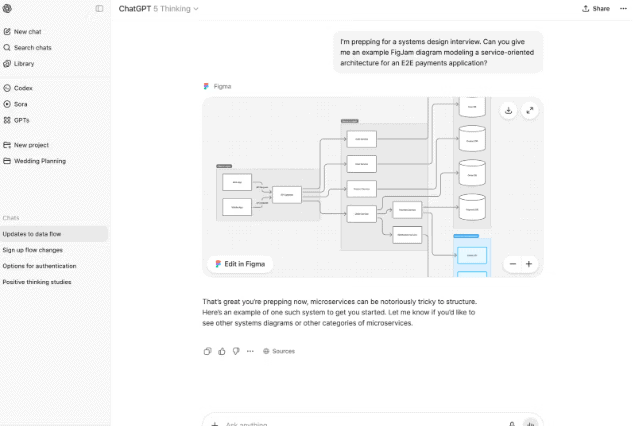
With ChatGPT, FigJam becomes AI-powered. You can:
- Generate mind maps from text.
- Visualize workflows or user journeys.
- Create sticky notes and diagrams for brainstorming sessions.
- Use prompts like “Create a customer journey for a new banking app” and see it appear instantly.
This makes early-stage ideation more visual and structured. Teams can go from abstract ideas to shareable diagrams in seconds without ever leaving the chat.
How Figma and ChatGPT Enhance the Design Process?
The true power of this integration lies in how it transforms the design workflow. Here’s how it makes a difference:
- Faster Ideation: Instead of starting from a blank canvas, designers can use ChatGPT to generate quick layouts, content blocks, or design systems and then refine them in Figma.
- Better Collaboration: Multiple stakeholders can interact with the AI and the design file simultaneously. Developers can ask ChatGPT for component names, marketers can generate on-brand copy, and designers can update visuals all in one ecosystem.
- Intelligent Automation: ChatGPT helps with naming layers, creating components, or suggesting accessibility improvements. This reduces repetitive work and lets designers focus on creativity.
- Enhanced Prototyping: With Figma’s prototyping tools and ChatGPT’s contextual understanding, teams can rapidly build and test interactive designs. For example, ChatGPT can suggest microcopy or generate placeholder text instantly.
Real-World Examples of the Integration in Action
Several early adopters are already seeing impressive outcomes:
- Design agencies are using ChatGPT to automate client brief conversions to turn text briefs into initial mockups in Figma.
- Product teams are running FigJam sessions with ChatGPT to generate user flows and personas on demand.
- Startups are saving hours by using AI-generated wireframes to kickstart MVPs.
Although still in the early stages of adoption, these examples demonstrate how this integration enables teams to move faster without compromising design quality.
Benefits of Using the Figma App in ChatGPT
The integration of the Figma App in ChatGPT is transforming how design teams work, collaborate, and create.
By combining AI-driven intelligence with Figma’s robust design ecosystem, this integration streamlines every phase of the creative process, from brainstorming to prototyping. Let’s explore the key benefits that make this collaboration truly revolutionary.
Speed: Design and Iterate Faster Than Ever
One of the most significant advantages of the Figma–ChatGPT integration is speed. Designers can now transition from concept to prototype in minutes, rather than hours.
With ChatGPT’s ability to interpret natural language, you can simply describe what you need, such as a mobile layout or a user flow, and Figma instantly brings it to life. This reduces the time spent on manual drafting, enabling faster iterations and quicker decision-making. In essence, your design cycle becomes more agile and efficient.
Creativity: Unlock Endless Design Possibilities
The collaboration encourages creative exploration. ChatGPT can generate multiple design variations based on prompts, enabling teams to experiment with different styles, layouts, and color schemes.
Instead of sticking to a single direction, designers can test several ideas and refine them collaboratively. This AI-driven ideation broadens creative horizons, sparking new design concepts that might not have emerged through traditional brainstorming.
Check out: Best MVP Tools That Every Startup Should Know
Consistency: Maintain a Unified Design Language
Consistency is key in professional design, and the integration helps ensure it. ChatGPT can recognize design patterns, suggest reusable components, and even maintain brand tone in content.
This means every element, from typography to spacing, aligns with your design system. As a result, teams can deliver cohesive designs across multiple projects without spending extra time on manual checks.
Accessibility: Empower Non-Designers to Contribute
Not everyone on a project team is a designer, and that’s where this integration shines. Through ChatGPT’s conversational interface, non-designers like marketers, writers, or managers can contribute ideas visually.
They can request layouts, suggest edits, or provide feedback directly in Figma without technical barriers. This makes design collaboration more inclusive and accessible to all stakeholders.
Integration: Unify Design, Feedback, and Collaboration
Lastly, the integration brings everything together in one place. Instead of switching between design tools, chat apps, and project dashboards, teams can ideate, design, and discuss within a single workflow.
This unified experience minimizes friction, enhances communication, and keeps everyone aligned, ensuring that every design decision is transparent and traceable.
Find out: Best AI Code Generator Tools for Figma to WordPress Conversion
Figma-ChatGPT Integration: Challenges and Best Practices
The Figma-ChatGPT integration is reshaping how design teams collaborate and create digital experiences. It combines the efficiency of AI with the flexibility of Figma’s design ecosystem, allowing designers to brainstorm, visualize, and refine concepts in a unified workflow.
However, as with any new app or innovation, there are certain challenges and best practices to consider. Understanding these can help teams maximize efficiency, maintain quality, and ensure the smooth development of digital products.
Challenges of the Figma-ChatGPT Integration
While this integration is a game-changer in the design space, it’s not without its hurdles. Let’s explore the most common challenges teams encounter and how to navigate them.
Accuracy: Aligning AI Output with Brand and UX Standards
One of the first challenges lies in accuracy. AI-generated designs may not always meet brand or UX designer standards. The AI can produce visually appealing layouts, yet sometimes overlook small but crucial elements like spacing, hierarchy, or accessibility compliance.
To counter this, designers must review outputs closely and adjust them according to the project’s design system. Figma’s auto layout and layer naming features can help streamline this process and maintain brand consistency.
Security: Safeguarding Design Data
Another key consideration is security. Since the integration involves transferring information between ChatGPT and Figma, ensuring data privacy is critical. Teams should use verified accounts, secure sharing permissions, and avoid uploading sensitive client materials.
For organizations based in tech-forward hubs like San Francisco, where product design often involves confidential code or prototypes, following company-approved data protocols is essential.
Dependency: Balancing Human and AI Input
It’s easy to get carried away with AI’s capabilities. However, complete dependency on automation can limit creativity. AI agents are powerful, but they function best when guided by human intuition. Teams should use AI to accelerate ideas, not replace human insight.
Remember, tools like Figma Make and ChatGPT are here to turn ideas into prototypes faster, but the ultimate responsibility for quality and originality still lies with human designers.
Best Practices for Using the Figma–ChatGPT Integration
To make the most of the integration, especially those working on UI UX and building digital products, should adopt a few strategic practices. These ensure the workflow remains efficient, creative, and secure.
Start Small: Begin with Ideation
When exploring AI-powered tools, start small. Use ChatGPT to generate simple wireframes, content blocks, or color palettes before diving into high-fidelity designs. This gradual approach helps teams learn the functionality of the new Figma app while reducing the risk of errors.
Review and Refine: Treat AI as a Creative Partner
Always treat AI output as a starting point, not the final version. Refine layouts, adjust proportions, and verify that each feature aligns with usability standards. A product designer should approach AI drafts the same way they would a junior designer’s mockup, with constructive evaluation and improvement.
Collaborate Actively: Encourage Team Participation
The integration thrives on real-time collaboration. Designers, developers, and content creators can work on the same file, exchange ideas, and offer instant feedback. When designers collaborate actively, they harness AI’s potential while maintaining the creative balance essential to professional design.
Stay Updated: Explore New Functionalities
Both Figma and OpenAI continue to introduce updates and AI tools that expand the capabilities of what teams can achieve. Staying informed about Figma’s AI enhancements, from improved automation to writing code suggestions, ensures you’re always leveraging the latest advancements. You can even create visuals or enhance an image directly within ChatGPT for smoother workflow integration.
The Future of Design with AI Tools
The Figma App in ChatGPT marks a major shift in how design teams operate. It points to a future where AI and human creativity work hand in hand, combining automation with empathy and discernment. Soon, we can expect:
- Smarter co-creation tools that predict design intent.
- Cross-platform integrations with tools like Notion, Jira, or Adobe XD.
- Voice-enabled design prompts for hands-free collaboration.
- Deeper analytics that connect user behavior insights directly to design changes.
The future designer won’t just use tools; they’ll collaborate with AI agents that understand context, creativity, and code.
Conclusion: Redefining Collaboration Through AI
The integration of the Figma App in ChatGPT isn’t just another feature; it’s a paradigm shift in digital design. It combines AI intelligence with human creativity, integrating ideation, visualization, and collaboration into a seamless process.
By connecting Figma’s powerful design environment with ChatGPT’s conversational intelligence, teams can go from idea to prototype in minutes, not days. The result is a faster, smarter, and more inclusive design process that empowers everyone involved.
Whether you’re a UX designer, a product manager, or simply someone who loves creating, the Figma App in ChatGPT opens a new frontier of possibilities where ideas don’t just stay in your head but come alive instantly through conversation.
FAQs About the Figma-ChatGPT Integration
What is the Figma App in ChatGPT?
The Figma App in ChatGPT is an integration that allows users to connect their Figma workspace directly to ChatGPT. It enables designers to generate, edit, and visualize design elements through simple text prompts, making the design process faster and more interactive.
How does ChatGPT help designers using Figma?
ChatGPT acts as an AI design assistant that interprets natural language commands to create wireframes, prototypes, and FigJam diagrams in Figma. It helps designers brainstorm ideas, automate repetitive tasks, and collaborate with team members more efficiently.
Can non-designers use the Figma App in ChatGPT?
Yes. One of the biggest advantages of this integration is its accessibility. Non-designers such as marketers, product managers, or writers can use natural language to create visuals or suggest changes in Figma without needing prior design experience.
Is the Figma-ChatGPT integration free to use?
Users can access the integration with a free account in Figma and ChatGPT (Pro version recommended for app access). Some advanced features may require paid subscriptions or workspace permissions, depending on the organization’s setup.
What makes the Figma-ChatGPT integration a game-changer?
This integration revolutionizes design by merging AI intelligence with creative workflows. It allows teams to collaborate in real time, receive instant feedback, and transform text-based ideas into interactive designs. Ultimately, making the entire design process more seamless, productive, and innovative.